Semaphore is a dev of TinyUmbrella tools has just released a new beta tools which is allow to save SHSH blob (Firmware signature) of the current firmware 8.1.3 and 8.2 (AS LONG AS Apple still signing.)
For those of you who don't know that apple not allowing you to downgrade to any previous firmware which is keeping you from jailbreaking your iDevice on the possible firmware version. That is what TinyUmbrella comes to play.
The SHSH blob is very important to create a pre-signed firmware which is cooked by redsn0w which bypass the apple firmware signing.But unfortunately Apple has blocked this possibility from iPhone4s up to later devices.
But good news Semaphore has just mentioned that TinyUmbrella will become useful again. So while apple still signing 8.1.3 and 8.2 which is claimed to be able to jailbreak by TaiG and will be releasing by the end of this month, so don't loose this chance. SAVE SHSH BLOB for your iDEVICES NOW !!!
The instruction is simple : goto download TinyUmbrella http://blog.firmwareumbrella.com/
currently there are both mac and windows version, and after that just launch the tools and click on Fetch OTA for All, and stay tuned...
Note : The SHSH blobs are saved at the following location: ~/.tu/.shsh
Showing posts with label iNews. Show all posts
Sunday, March 22, 2015
Monday, February 23, 2015
iOS 8.1.3 Jailbreak expectation
With a new version of iOS 8.1.3 Apple has patched the exploit which is used by TaiG to jailbreak your iDevices.
For those of you who still want to get your iDevices Jailbroken, you need to stay where you are DO NOT upgrade to the current firmware 8.1.3
However TaiG said there's still be a possibility of jailbreaking iOS 8.1.3 and 8.2, and still in the progress and the tool is expecting to be released in April. So stay calm and be patient for those of you who running 8.1.3
For those of you who still want to get your iDevices Jailbroken, you need to stay where you are DO NOT upgrade to the current firmware 8.1.3
However TaiG said there's still be a possibility of jailbreaking iOS 8.1.3 and 8.2, and still in the progress and the tool is expecting to be released in April. So stay calm and be patient for those of you who running 8.1.3
Thursday, December 25, 2014
Apple Reportedly Declined Offer From Sony Pictures to Stream 'The Interview' on iTunes
Apple reportedly declined an offer form Sony Pictures to stream the controversial film "The Interview" on iTunes. According to The New York Times, Apple showed no interest to stream the film, especially with the speedy time table Sony was requesting.
It remained unclear, however, whether any on-demand service would take “The Interview.” According to people briefed on the matter, Sony had in recent days asked the White House for help in lining up a single technology partner — Apple, which operates iTunes — but the tech company was not interested, at least not on a speedy time table. An Apple spokesman declined to comment.
"The Interview" has become a highly-anticipated film after it was cancelled by Sony Pictures. Hackers (presumably with ties to North Korea) breached Sony's internal systems and leaked terabytes of data. Additionally, the hackers threatened any theater that participated in the movie's release, which was slated for December 25 -- Christmas Day; however, Sony changed its plans and is now releasing the film in online, through its website, and some theaters.
The movie depicts two journalists (James Franco and Seth Rogen) that travel to North Korea to assassinate Kim Jong-un.
It remained unclear, however, whether any on-demand service would take “The Interview.” According to people briefed on the matter, Sony had in recent days asked the White House for help in lining up a single technology partner — Apple, which operates iTunes — but the tech company was not interested, at least not on a speedy time table. An Apple spokesman declined to comment.
"The Interview" has become a highly-anticipated film after it was cancelled by Sony Pictures. Hackers (presumably with ties to North Korea) breached Sony's internal systems and leaked terabytes of data. Additionally, the hackers threatened any theater that participated in the movie's release, which was slated for December 25 -- Christmas Day; however, Sony changed its plans and is now releasing the film in online, through its website, and some theaters.
The movie depicts two journalists (James Franco and Seth Rogen) that travel to North Korea to assassinate Kim Jong-un.
Wednesday, December 17, 2014
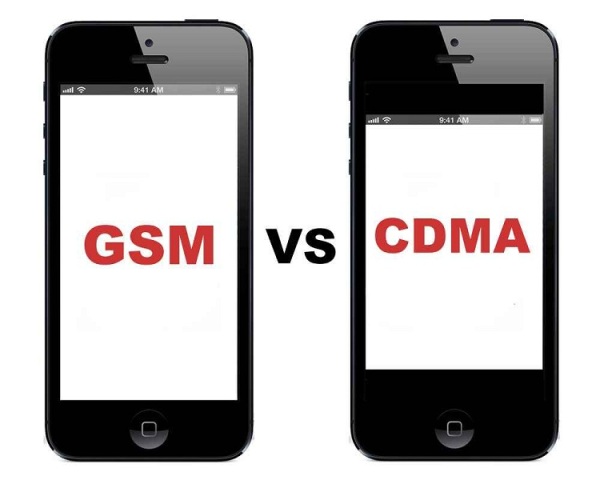
How to identify iPhone GSM or CDMA
Here following is the official list of iPhone GSM and CDMA from Apple :
http://support.apple.com/en-us/HT201296
For those of you who still wondering what is GSM and CDMA (GLOBAL) Here is the description from wiki :
. GSM (Global System for Mobile Communications, originally Groupe Spécial Mobile), is a standard developed by theEuropean Telecommunications Standards Institute (ETSI) to describe protocols for second-generation (2G) digital cellular networks used by mobile phones. As of 2014 it has become the default global standard for mobile communications - with over 90% market share, operating in over 219 countries and territories
. CDMA (Code division multiple access) is a channel access method used by various radio communication technologies.
CDMA is an example of multiple access, which is where several transmitters can send information simultaneously over a single communication channel. This allows several users to share a band of frequencies (see bandwidth). To permit this without undue interference between the users, CDMA employs spread-spectrum technology and a special coding scheme (where each transmitter is assigned a code).
CDMA is used as the access method in many mobile phone standards such as cdmaOne, CDMA2000 (the 3G evolution of cdmaOne), and WCDMA (the 3G standard used by GSM carriers), which are often referred to as simply CDMA.
Friday, November 21, 2014
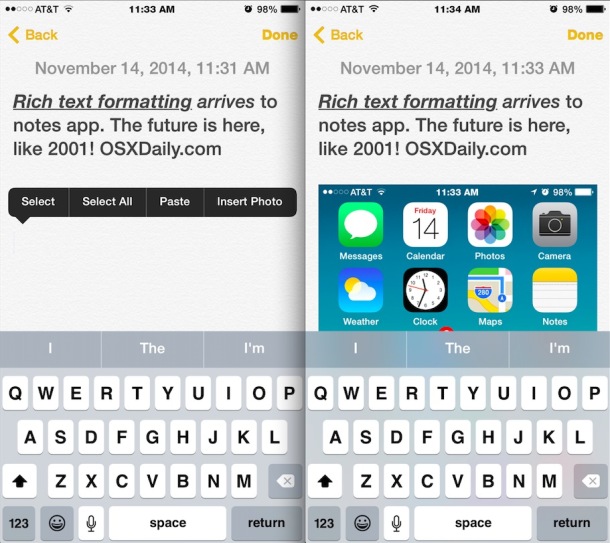
Insert Photos into iOS8 Notes
I've just realized iOS 8 Notes can be embeded with photo, the insertion is simple just tap and hold on your note and then click on Insert Photo button.
Wednesday, October 29, 2014
Monday, February 10, 2014
Wednesday, February 5, 2014
Timeflies Tuesday: iTribute to Steve Jobs [Video]
Timeflies has composed a nice tribute song to Steve Jobs.
This week, rather than our usual freestyle, we wanted to take the time to put something together that was more serious to show respect for an innovator who has been such a big part of our lives.
For Lyrics go to: http://timefliesmusic.com/2011/10/12/itribute-2/
"All of this was shot on an iPad 2 and edited using iMovie, recorded, mixed, and mastered on an iMac. The beat was made using samples from OSX and iOS - everything on a Tuesday."
DOWNLOAD: http://www.mediafire.com/?xfn68y9p19v32rd
If you enjoyed this song you might also want to check out 'Thank You Steve', a song dedicated to Steve Jobs and composed from only Mac sounds and Steve Jobs' voice.
Tuesday, December 31, 2013
Whited00r 7 brings iOS 7’s new look to older devices
Whited00r 7 brings the look and feel of iOS7 to older devices no longer supported by Apple. Our firmware has been engineered to replicate iOS7 down to the smallest detail. Whited00r’s first priority is speed. None of the modifications Whited00r makes to your device will slow it down.
Some of Whited00r 7’s features:
Multitasking with a card-based interface:

Control Center

iOS 7 like Push Notifications.

For the entire feature list, visit this page.
Whited00r 7 is compatible with the following devices:
iPhone 2G
iPhone 3G
iPod touch 1G
iPod touch 2G
If you’re interested, you can see the installation instructions here. Note that Whited00r is completely unofficial, so proceed with caution.
Some of Whited00r 7’s features:
Multitasking with a card-based interface:

Control Center

iOS 7 like Push Notifications.

For the entire feature list, visit this page.
Whited00r 7 is compatible with the following devices:
iPhone 2G
iPhone 3G
iPod touch 1G
iPod touch 2G
If you’re interested, you can see the installation instructions here. Note that Whited00r is completely unofficial, so proceed with caution.
Saurik Releases Cydia Substrate 0.9.5000 With Support for iOS 7 and the iPhone 5s
Saurik has just released Mobile Substrate 0.9.5000 now which is fully supported with iOS7 and the iPhone 5s. So hit cydia and update all the updates in changes tab. Everything should be fine now.. for font khmer you can reinstall the font and keyboard.
Tuesday, November 5, 2013
Install khmer font for iOS 7.x.x without Jailbreak
1. Open your safari and browse the link
http://4khmeriphone.com/ios7
2. The link will prompt you to the installation, just click install
3. Reboot. Enjoy !
http://4khmeriphone.com/ios7
2. The link will prompt you to the installation, just click install
3. Reboot. Enjoy !
Wednesday, October 23, 2013
MuscleNerd Twitted : 7.0.3's lock screen fixed won't impact the Jailbreak
MuscleNerd Twitted : 7.0.3's lock screen fixed won't impact the Jailbreak. MEANS IT IS SAFE TO UPGRADE TO 7.0.3 if you're running 7.x.x
You can also UPGRADE to 7.0.3 if you're running 6.x.x BUT be aware that THERE IS NO JAILBREAK YET from 6.1.3 to 7.0.3
And currently there are two teams are working on the jailbreak, one is iH8sn0w which are in the process of jailbreaking 6.1.3 and 6.1.4 and another team is Evad3rs which is working on 7.x.x so stay tuned and be patient !!
Wednesday, October 9, 2013
10 Tips On How To Use iPhone Headphones
You can use the center button (between the volume up (+) and volume down (-) buttons) on the mic portion of your headphones to perform some useful functions without taking your iOS device from your pocket.
If you use headphones with your iPhone, iPad or iPod touch then you will find these tips quite handy.
Here are 10 cool things you can do with the buttons on your headphones (some of you may already know them):
1. Activate Siri
iPhone 4S users can activate Siri by pressing and holding the center button.
2. Take a Photo
Launch the Camera app and press the volume-up (+) button on the headphone to take a photo. (This feature is available in iOS 5 or later)
3. Pause/Play a Song or Video
You can pause or play a song or video by pressing the center button.
4. Skip to the Next Song or Chapter
To skip the next song or chapter, press the center button twice quickly.
5. Go to Previous Song or Chapter
To go back to the previous song, press the center button thrice quickly.
6. Fast Forward a Song
To fast forward a song, press the center button twice and hold the center button on the second press.
7. Rewind a Song
To rewind a song, press the center button thrice and hold the center down on the third press.
8. Answer a Call or Hang up
If you get a call, press the center button to answer it and press it again to hang up.
9. Decline Incoming Call
To decline an incoming call, press the center button and hold for approximately two seconds. You should hear two beeps, which confirms that the caller was sent to voicemail.
10. Switch Calls
If you get a new call when you’re on the phone, press the center button once to switch calls. To end that new call, press and hold the center button down for 2 seconds.
Please note that these tricks should work with any headphones that include a remote or have a remote adapter. These tricks should also work on your iPad and iPod touch (except activating Siri).
Wednesday, July 10, 2013
Extensive List of What's New in iOS 7 Beta 3
Changes:
● New fonts in Weather app

● Tweaked clock icon in control center

● Clock now shows when you play music

● New App Store tabs

● New downloading animation for app installs


● Slightly tweaked notification center UI (text messages texts are now transparent as well)

● Calendar now show an indicator when you have an event

● Dictionary now works

● Signal strength and battery status bar seem to be larger on the lock screen.

● Podcast app, eBay app and more now work

● Safari keyboard has no .com button anymore (hold period button instead)

● New font in Settings and Messages app via Cabel

● Music player app has new tabs as well

● Mail has tweaked search bar and pull to refresh

● Wallpaper preview in Settings now shows iOS 7 lock screen instead of iOS 6, tweaked UI

● New UI for arranging tab-bar icons

● Control Center has a grabber in full screen apps now
● iTunes Radio has new slider/discovery feature
● Video player top bar is now one shade with the status bar
● You can now download full albums from iCloud if you have iTunes Match
● Now Playing is fully displayed now
● New mute/silent feature in iPad Control Center
● Game Center UI Tweaks
● higher-quality 2x scaling on iPad
● Calculator.app has new feedback when pressing a key
● New Wifi Diagnostics mode
● Siri navigation, access and voice has been updated
● Spotlight search as new animation
● Tapping a song in now playing screen lets you rate the song
● New fade animation when pressing the power button (time background and status bar)
● Folders are more transparent
● You can now use apps while they're updating
● New animation when compressing video to be shared in message/email
● Boot up no longer shows spinning wheel
● Opening Messages no longer opens to unread message but instead opens to the main list view
● New animation when moving mail into a folder [Thanks Luay]
● When emailing a passbook pass, it appears as a pass in the email [Thanks Kronos]
● The charging lightning bolt indicator no longer blinks, it is now static [Thanks Kamatis]
● Safari has new bolder loading bar, private browsing UI tweaks and tab/bookmark changes on the iPad [Thanks Mackan1]
● Overall speed improvements, bug fixes and battery improvements have been reported, but not verified.
● New fonts in Weather app

● Tweaked clock icon in control center

● Clock now shows when you play music

● New App Store tabs

● New downloading animation for app installs


● Slightly tweaked notification center UI (text messages texts are now transparent as well)

● Calendar now show an indicator when you have an event

● Dictionary now works

● Signal strength and battery status bar seem to be larger on the lock screen.

● Podcast app, eBay app and more now work

● Safari keyboard has no .com button anymore (hold period button instead)

● New font in Settings and Messages app via Cabel

● Music player app has new tabs as well

● Mail has tweaked search bar and pull to refresh

● Wallpaper preview in Settings now shows iOS 7 lock screen instead of iOS 6, tweaked UI

● New UI for arranging tab-bar icons

● Control Center has a grabber in full screen apps now
● iTunes Radio has new slider/discovery feature
● Video player top bar is now one shade with the status bar
● You can now download full albums from iCloud if you have iTunes Match
● Now Playing is fully displayed now
● New mute/silent feature in iPad Control Center
● Game Center UI Tweaks
● higher-quality 2x scaling on iPad
● Calculator.app has new feedback when pressing a key
● New Wifi Diagnostics mode
● Siri navigation, access and voice has been updated
● Spotlight search as new animation
● Tapping a song in now playing screen lets you rate the song
● New fade animation when pressing the power button (time background and status bar)
● Folders are more transparent
● You can now use apps while they're updating
● New animation when compressing video to be shared in message/email
● Boot up no longer shows spinning wheel
● Opening Messages no longer opens to unread message but instead opens to the main list view
● New animation when moving mail into a folder [Thanks Luay]
● When emailing a passbook pass, it appears as a pass in the email [Thanks Kronos]
● The charging lightning bolt indicator no longer blinks, it is now static [Thanks Kamatis]
● Safari has new bolder loading bar, private browsing UI tweaks and tab/bookmark changes on the iPad [Thanks Mackan1]
● Overall speed improvements, bug fixes and battery improvements have been reported, but not verified.
Tuesday, June 25, 2013
Semi-Restore Lets You Wipe Your iPhone Without Losing Your Jailbreak [Released]
Semi-Restore is a new solution for iPhone, iPad, and iPod touch users who want to wipe their device clean without losing their jailbreak.
Created by CoolStar, the process will restore your device running iOS 5.0 through 6.1.2 to near stock condition. It's performed using a simple one click app that is available to download for Mac, Windows, and Ubuntu.
What this does do
● Uninstalls all Cydia packages
● Fixes host file issues
● Erases all user data
● Fixes permissions
● Fixes activation issues
● Fixes iMessage/Facetime issues
● Fixes Safe mode issues randomly appearing
● Reinstalls Cydia (in case it was deleted)
What this does not do
● Upgrade your iOS Version
● Downgrade your iOS Version
● Jailbreak your iOS Device
● Fix broken System Files
Notes:
● SemiRestore supports Windows XP SP3 or higher, OS X 10.6 or higher, and Ubuntu 12.10 or higher (or the equivalent Linux).
● There may be a better way to fix your current problem. For example, to fix "Safe Mode" issues, you can just uninstall Mobile Substrate from Cydia.
● Like any other restore, make sure you backup your data if you want it later.
● Avoid using your iOS device or anything related to iTunes or XCode during the Semi-Restore. Why not actually go outside?
● This process can not and does not repair broken system files! Avoid all Siri Ports, as they are not only illegal (except for Spire on 5.0.1) but they also create problems and may potentially break system files (even Spire can cause this).
● Your device will respring or reboot several times during the Semi-Restore. This is perfectly normal, so don't panic.
Friday, June 14, 2013
Update to iOS7 Beta.
Currently the iOS7 is in beta version which is available for only apple developers, but actually it is also for end-user for a try in the mean time.
iOS7 support from iPhone 4 up to iPhone 5, in order to update to iOS7 Beta we need to proceed these following points :
. Back up your iDevice
. Make sure you iDevice is running iOS 6.1.3 and already activated
. Download iOS7 Beta for your iDevices accordingly, you can find the link in this
site http://thepiratebay.sx/search/ios%207/0/99/0
. Plug your iDevice into computer and fire up your latest iTunes and click on :
- Windows : Shift + Update
- Mac : Option key + Update
. Done.!!
Note :
. Do not use restore button in iTunes, use button update, because it is cannot be activated yet unless
you have developer ID. That's why we MUST update from iOS 6.1.3 to preserve the activation.
. iOS7 cannot be jailbroken yet, so decide your own decision.
Tuesday, June 11, 2013
NEW iOS 7 Beta 1 Features, In-depth Demo & Review
It's currently possible update to iOS 7 without having your iPhone's UDID registered in a developer account.
We were first alerted to this by iClarified reader Will Peterson who performed the update on two iPhone 5s. We have tested and confirmed it working on the iPhone 4S, a brand new iPhone 5, and an additional iPhone 5.
To perform the update you must get a hold of the iOS 7 ipsw, press and hold the Option key (Shift for Windows) and click Update in iTunes. Select the iOS 7 ipsw from the popup window to install.
It's unclear why this is working. Only iPhone devices registered by developers are supposed to be able to install beta firmware. Perhaps Apple took down this check since its servers are being flooded at the moment.
Enjoy!
iPhone 5 (Model A1428) [Mirror]
iPhone 5 (Model A1429) [Mirror]
iPhone 4S [Mirror]
iPhone 4 (GSM Rev A) [Mirror]
iPhone 4 (GSM) [Mirror]
iPhone 4 (CDMA) [Mirror]
iPod touch (5th generation) [Mirror]
This is a pre-release version of iOS 7 beta for iPhone and iPod touch. Devices updated to iOS 7 beta can not be restored to earlier versions of iOS.
Posted: June 10, 2013
Build: 11A4372q
Monday, May 6, 2013
Friday, April 19, 2013
The differences of RAM DDR1, DDR2, DDR3
DDR2: 100MHZ - 133MHZ 1600MB/s - 2133MB/s
DDR3 : 133MHZ 2666MB/s
Power consuming : DDR > DDR2 > DDR3
DDR1 : 2.5 V
DDR2 : 1.8 V
DDR3 : 1.5 V
Price : DDR > DDR2 > DDR3
because of its availability.
Size : the 3 RAMs have the same size but different notch position, take a look at the picture.
Friday, April 5, 2013
Subscribe to:
Posts (Atom)