Pangu has just released a version to untethered jailbreak iOS8.x with a possibility to install Cydia, which is supported with these following devices :
iPhone 6, iPhone 6 Plus, iPhone 5s, iPhone 5c, iPhone 5, iPhone 4S
iPad Air, iPad 4, iPad 3, iPad 2
iPad mini, Retina iPad mini
iPod touch 5G
And before jailbreaking you should backup your iDevices, update iTunes to the latest one, go to setting > Passcode Lock on > Turn Passcode off
And follow these steps :
Step 1 : Download Pangu from www.pangu.io
Step 2 : Download your firmware from this link http://iblogipple.blogspot.com/2011/05/all-firmwares-available-for-iphone.html
Step 3 : Launch iTunes > Connect your iDevice to your iTunes > Back up your iDevices > Shift + Restore (Windows) Option + Restore (Mac) > Select your firmware which you downloaded in Step 2 > Wait till the restoration finished.
Step 4 : Go to disable Passcode and Find my iPhone in your setting.
Step 5 : Go to pangu which you downloaded in Step 1, right click and choose " Run as administrator"
Step 6 : You should see this screen
Step 7 : Uncheck the check box and clik on the blue botton and waiting till the process is finished, nomarlly it takes from 5 to 10 minutes, after that you should see the pangu app on your springboard
Step 8 : Click on Pangu app and install cydia from there.
Enjoy !!
Friday, October 31, 2014
Thursday, October 30, 2014
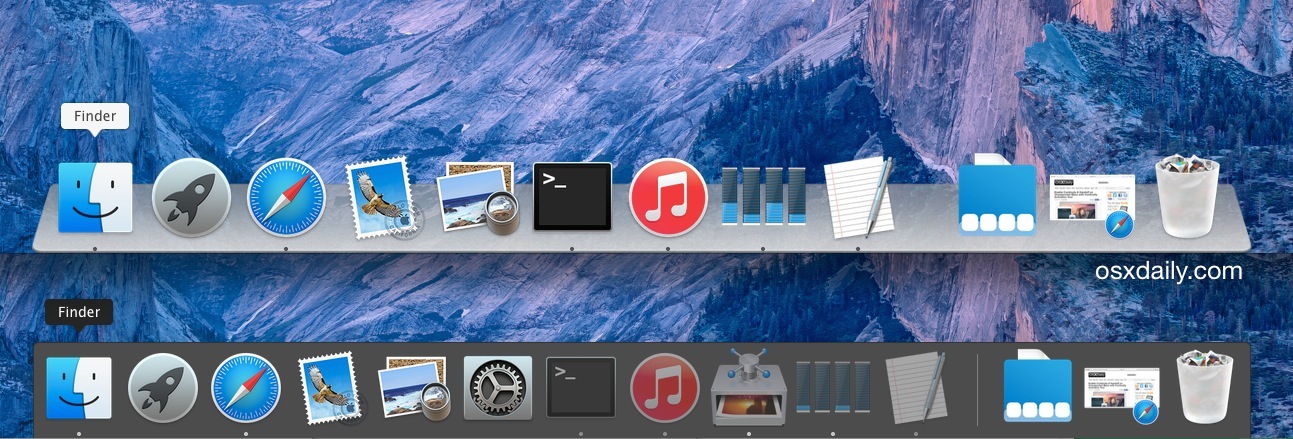
Turn 3D effect on Yosemite Dock
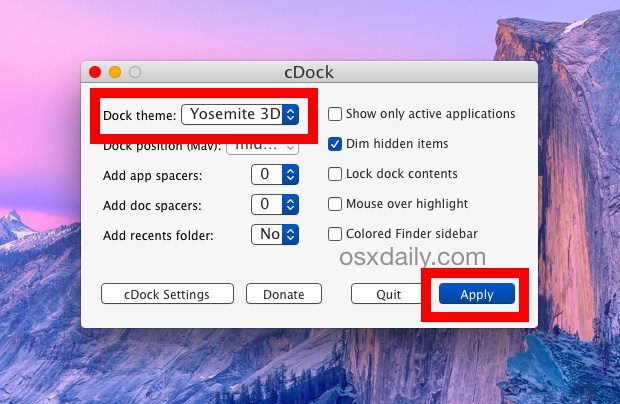
1. Get CDock for free from Source Forget (click the green download button)
2. Unzip the app you’ll need to right-click and choose to “Open” to circumvent Gatekeeper restrictions
3. Click the “Dock theme:” submenu and choose “Yosemite 3D”, then click on “Apply”
4. The Dock will refresh and magically turn 3D again
You can also choose a transparent dock.
Wednesday, October 29, 2014
Apple watch UI in iPhone
How to install Apple Watch UI in the iPhone, follow this 2 simple steps instruction :
1. Open cydia add source : www.cydia.myrepospace.com/lamerz
2. Install Apple Watch Springboard
All iPhone firmwares UPDATED.
Latest:
8.1.0 (4S): iPhone4,1_8.1_12B411_Restore.ipsw
8.1.0 (5 GSM): iPhone5,1_8.1_12B411_Restore.ipsw
8.1.0 (5 GSM+CDMA): iPhone5,2_8.1_12B411_Restore.ipsw
8.1.0 (5c GSM): iPhone5,3_8.1_12B411_Restore.ipsw
8.1.0 (5c GSM+CDMA): iPhone5,4_8.1_12B411_Restore.ipsw
8.1.0 (5s GSM): iPhone6,1_8.1_12B411_Restore.ipsw
8.1.0 (5s GSM+CDMA): iPhone6,2_8.1_12B411_Restore.ipsw
8.1.0 (6+): iPhone7,1_8.1_12B411_Restore.ipsw
8.1.0 (6): iPhone7,2_8.1_12B411_Restore.ipsw
Friday, February 21, 2014
Mobius cydia tweak for iOS7
Mobius cydia tweak breaks the ending of you springboard pages, you can scroll all you pages in circle.
Repo : repo.tylercasson.com
Tweak : Mobius
Monday, February 10, 2014
Wednesday, February 5, 2014
Timeflies Tuesday: iTribute to Steve Jobs [Video]
Timeflies has composed a nice tribute song to Steve Jobs.
This week, rather than our usual freestyle, we wanted to take the time to put something together that was more serious to show respect for an innovator who has been such a big part of our lives.
For Lyrics go to: http://timefliesmusic.com/2011/10/12/itribute-2/
"All of this was shot on an iPad 2 and edited using iMovie, recorded, mixed, and mastered on an iMac. The beat was made using samples from OSX and iOS - everything on a Tuesday."
DOWNLOAD: http://www.mediafire.com/?xfn68y9p19v32rd
If you enjoyed this song you might also want to check out 'Thank You Steve', a song dedicated to Steve Jobs and composed from only Mac sounds and Steve Jobs' voice.
Subscribe to:
Posts (Atom)