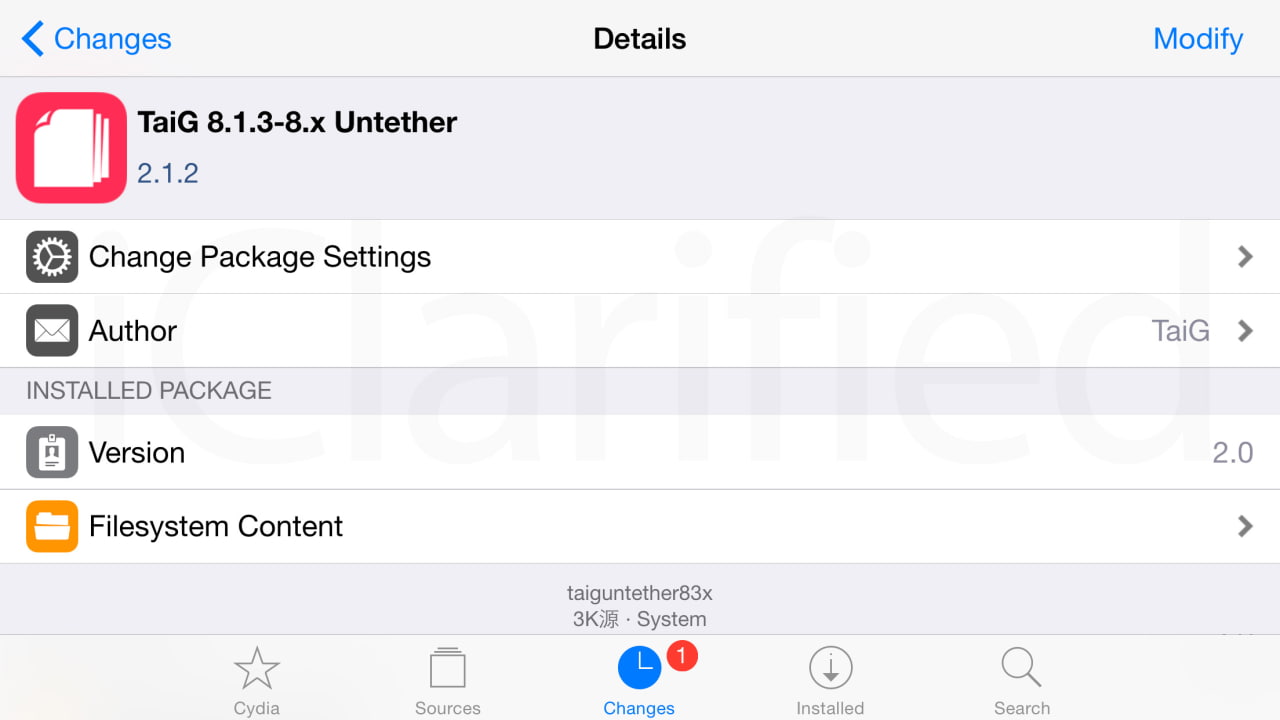
TaiG has just released TaiG 8.1.2-8.x untether 2.1.2 in cydia to fix the problem of Cydia substrate which was not working after the jailbreak, for those of you who jailbroken, all you need to do is :
- run your cydia and add this source : http://apt.taig.com
- Update TaiG 8.1.2-8.x untether
- Reboot your device.... DONE !
Friday, June 26, 2015
Tuesday, June 23, 2015
Wednesday, May 27, 2015
PayPal App for iPhone Updated With Touch ID Support for Login
Pay Smarter. Pay Simpler. Pay Anywhere. The world’s safest way to pay online is now at your favorite restaurants, stores, and more. Introducing your new digital wallet.
PayPal Now Accepted in Stores
Take PayPal with you to local stores, cafes, restaurants and more. Use the app to pay with your phone. Even better, use the PayPal app to order ahead.
Send & Request Money
Pay back a friend for lunch. Chip in for a gift. Collect money for a work outing. PayPal lets you transfer money between friends instantly.
Manage Your Account
Check your balance, see your transactions, or add and withdraw funds —anytime, anywhere.
Even More...
• Get special offers only available to PayPal customers.
• Online or on-the-go, your financial info is always secure with PayPal.
What's New In This Version:
- Use your phone’s Touch ID to log into the PayPal app.
- We’re fixing bugs as fast as we find them. If you see any, let us know.
You can download PayPal from the App Store for free.
PayPal Now Accepted in Stores
Take PayPal with you to local stores, cafes, restaurants and more. Use the app to pay with your phone. Even better, use the PayPal app to order ahead.
Send & Request Money
Pay back a friend for lunch. Chip in for a gift. Collect money for a work outing. PayPal lets you transfer money between friends instantly.
Manage Your Account
Check your balance, see your transactions, or add and withdraw funds —anytime, anywhere.
Even More...
• Get special offers only available to PayPal customers.
• Online or on-the-go, your financial info is always secure with PayPal.
What's New In This Version:
- Use your phone’s Touch ID to log into the PayPal app.
- We’re fixing bugs as fast as we find them. If you see any, let us know.
You can download PayPal from the App Store for free.
Friday, May 22, 2015
Fix Dropbox indicator is not shown in Elementary OS Freya
1. Remove your previous installed dropbox from your system, you can do by apt-get remove dropbox or go to remove from your software center
2. Make sure you delete .dropbox-dist in your home directory, you can do this via your terminal :
sudo rm -fr ~/.dropbox-dist
3. Download this zip file Elementary Mods to your downloads folder
4. Extract the zip file
5. Open your terminal and navigate to your extracted folder location
6. Fire these command lines in order :
./dropbox-elementary.sh
sudo ./dropbox-elementary.sh
./dropbox-elementary.sh
7. Reboot your system after login you should see dropbox indicator icon on the top panel.
2. Make sure you delete .dropbox-dist in your home directory, you can do this via your terminal :
sudo rm -fr ~/.dropbox-dist
3. Download this zip file Elementary Mods to your downloads folder
4. Extract the zip file
5. Open your terminal and navigate to your extracted folder location
6. Fire these command lines in order :
./dropbox-elementary.sh
sudo ./dropbox-elementary.sh
./dropbox-elementary.sh
7. Reboot your system after login you should see dropbox indicator icon on the top panel.
Fix color picker not working on LibreOffice 4.4.x.x
Fire up Terminal and paste the following command,
> cd /usr/lib/libreoffice/share/config/soffice.cfg/svx/ui
> sudo nano colorwindow.ui
You now need to set the “Visible” flag of the GtkWindow to “False” instead of “True” (currently its on line 15)
Ctrl + o , press enter to save the file.
Ctrl + x to exit
Open Libreoffice and check if the color picker now works.
Sunday, March 22, 2015
TinyUmbrella is back with a hope of downgrading..
Semaphore is a dev of TinyUmbrella tools has just released a new beta tools which is allow to save SHSH blob (Firmware signature) of the current firmware 8.1.3 and 8.2 (AS LONG AS Apple still signing.)
For those of you who don't know that apple not allowing you to downgrade to any previous firmware which is keeping you from jailbreaking your iDevice on the possible firmware version. That is what TinyUmbrella comes to play.
The SHSH blob is very important to create a pre-signed firmware which is cooked by redsn0w which bypass the apple firmware signing.But unfortunately Apple has blocked this possibility from iPhone4s up to later devices.
But good news Semaphore has just mentioned that TinyUmbrella will become useful again. So while apple still signing 8.1.3 and 8.2 which is claimed to be able to jailbreak by TaiG and will be releasing by the end of this month, so don't loose this chance. SAVE SHSH BLOB for your iDEVICES NOW !!!
The instruction is simple : goto download TinyUmbrella http://blog.firmwareumbrella.com/
currently there are both mac and windows version, and after that just launch the tools and click on Fetch OTA for All, and stay tuned...
Note : The SHSH blobs are saved at the following location: ~/.tu/.shsh
For those of you who don't know that apple not allowing you to downgrade to any previous firmware which is keeping you from jailbreaking your iDevice on the possible firmware version. That is what TinyUmbrella comes to play.
The SHSH blob is very important to create a pre-signed firmware which is cooked by redsn0w which bypass the apple firmware signing.But unfortunately Apple has blocked this possibility from iPhone4s up to later devices.
But good news Semaphore has just mentioned that TinyUmbrella will become useful again. So while apple still signing 8.1.3 and 8.2 which is claimed to be able to jailbreak by TaiG and will be releasing by the end of this month, so don't loose this chance. SAVE SHSH BLOB for your iDEVICES NOW !!!
The instruction is simple : goto download TinyUmbrella http://blog.firmwareumbrella.com/
currently there are both mac and windows version, and after that just launch the tools and click on Fetch OTA for All, and stay tuned...
Note : The SHSH blobs are saved at the following location: ~/.tu/.shsh
Friday, March 13, 2015
AirBlue Sharing Cydia tweak for iOS8
AirBlue Sharing for iOS 8 is working with all Bluetooth Devices like Laptop and Android. Follow the video instruction and Enjoy your sharing !!!
Monday, March 2, 2015
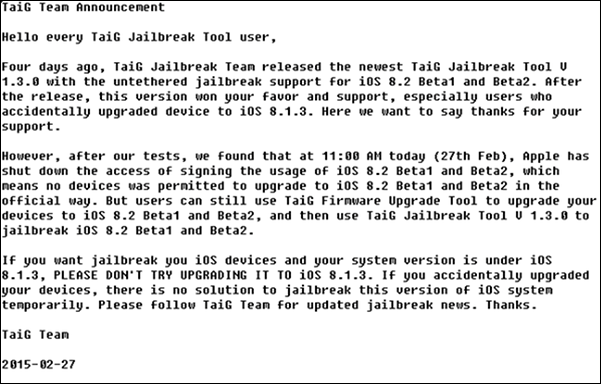
Apple stop signing iOS 8.2 Beta 1 and Beta 2
signing iOS 8.2 Beta 1 and Beta 2 now and will be releasing the final iOS 8.2 at any time, it means there is no way to upgrade to iOS 8.2 Beta 1&2 , so it is mean there is no possible way to get your iDevice Jailbroken IF your iDevice not yet running iOS 8.2 Beta 2. But it seems like a small chance if you are running iOS 8.1.3, look at what TaiG Team said :
Friday, February 27, 2015
Carrier Settings Update prompt.
You are probably prompted with the Carrier Settings Update. Actually it is safe to click on the update to fix the problem of the carrier setting itself, Anyway for those of you who use GPP Sim to unlock, you also free to update according to the GPP forum :
Q: I installed a new three networks dedicated patch NEW GPP, why will pop-up operators to update?
A: NEW GPP is crack update operators are not shielded carrier updates, update prompt will still pop up, but click update would not suffer carriers blocked, please rest assured.
Q: I installed a new three networks dedicated patch NEW GPP, why will pop-up operators to update?
A: NEW GPP is crack update operators are not shielded carrier updates, update prompt will still pop up, but click update would not suffer carriers blocked, please rest assured.
Subscribe to:
Posts (Atom)