Fire up Terminal and paste the following command, > cd /usr/lib/libreoffice/share/config/soffice.cfg/svx/ui > sudo nano colorwindow.ui
You now need to set the “Visible” flag of the GtkWindow to “False” instead of “True” (currently its on line 15)
Ctrl + o , press enter to save the file.
Ctrl + x to exit
Open Libreoffice and check if the color picker now works.
Semaphore is a dev of TinyUmbrella tools has just released a new beta tools which is allow to save SHSH blob (Firmware signature) of the current firmware 8.1.3 and 8.2 (AS LONG AS Apple still signing.)
For those of you who don't know that apple not allowing you to downgrade to any previous firmware which is keeping you from jailbreaking your iDevice on the possible firmware version. That is what TinyUmbrella comes to play.
The SHSH blob is very important to create a pre-signed firmware which is cooked by redsn0w which bypass the apple firmware signing.But unfortunately Apple has blocked this possibility from iPhone4s up to later devices.
But good news Semaphore has just mentioned that TinyUmbrella will become useful again. So while apple still signing 8.1.3 and 8.2 which is claimed to be able to jailbreak by TaiG and will be releasing by the end of this month, so don't loose this chance. SAVE SHSH BLOB for your iDEVICES NOW !!!
The instruction is simple : goto download TinyUmbrella http://blog.firmwareumbrella.com/ currently there are both mac and windows version, and after that just launch the tools and click on Fetch OTA for All, and stay tuned...
Note : The SHSH blobs are saved at the following location: ~/.tu/.shsh
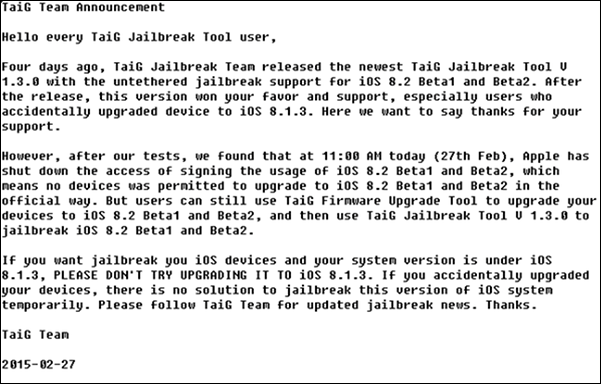
signing iOS 8.2 Beta 1 and Beta 2 now and will be releasing the final iOS 8.2 at any time, it means there is no way to upgrade to iOS 8.2 Beta 1&2 , so it is mean there is no possible way to get your iDevice Jailbroken IF your iDevice not yet running iOS 8.2 Beta 2. But it seems like a small chance if you are running iOS 8.1.3, look at what TaiG Team said :
You are probably prompted with the Carrier Settings Update. Actually it is safe to click on the update to fix the problem of the carrier setting itself, Anyway for those of you who use GPP Sim to unlock, you also free to update according to the GPP forum :
Q: I installed a new three networks dedicated patch NEW GPP, why will pop-up operators to update?
A: NEW GPP is crack update operators are not shielded carrier updates, update prompt will still pop up, but click update would not suffer carriers blocked, please rest assured.
Make sure you turn off your passcode and Touch ID before you reboot your iDevices After you installed any tweaks from Cydia, because some tweaks might get your iDevices into BOOT LOOP state which is cannot be bypassed by reboot + holding your volume button IF YOU LEFT YOUR PASSCODE AND TOUCH ID ON.
So again for those of you who love to tweak your iPhone with the current jailbreak PP Jailbreak, you should turn off your passcode and Touch ID everytime you reboot your iDevices.
Are you running iOS 8.1.3 and waiting for the jailbreak ?
And you heard that PP Jailbreak can only jailbreak iOS 8.1.2 downward, no THAT AIN'T TRUE !!
Actually Apple seeded the iOS 8.2 Beta 2 with no expiry, means you can running this beta2 forever. And fortunately PP Jailbreak can jailbreak the iOS 8.2 Beta 2.
But currently you cannot download the iOS 8.2 Beta 2 even if you have the developer Apple ID. and here is the link where you can try to download the correspond firmware the Beta 2 for your iDevices :
With a new version of iOS 8.1.3 Apple has patched the exploit which is used by TaiG to jailbreak your iDevices.
For those of you who still want to get your iDevices Jailbroken, you need to stay where you are DO NOT upgrade to the current firmware 8.1.3
However TaiG said there's still be a possibility of jailbreaking iOS 8.1.3 and 8.2, and still in the progress and the tool is expecting to be released in April. So stay calm and be patient for those of you who running 8.1.3