iDock

iSteve

R.I.P STEVE JOBS 1955-FOREVER [PHYSICALLY GONE, MENTALLY STAYED.] THANK YOU STEVE FOR BRINGING THOSE GENIUS iDEVICES AND TURNING THE WORLD INTO THE COLORFUL GLOBE AND YOU'RE FOREVER MISSED.
Showing posts with label iMac. Show all posts

Thursday, October 30, 2014

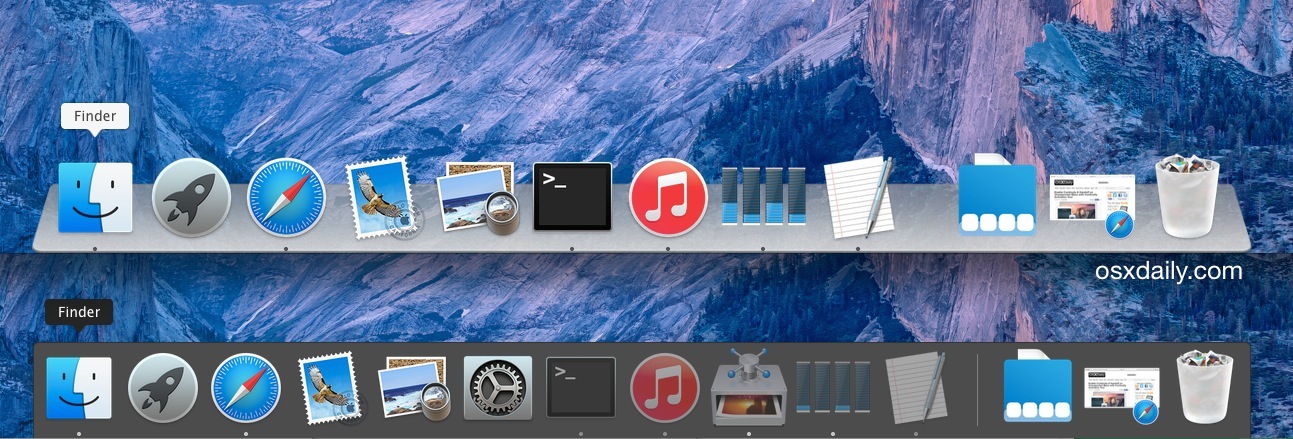
Turn 3D effect on Yosemite Dock


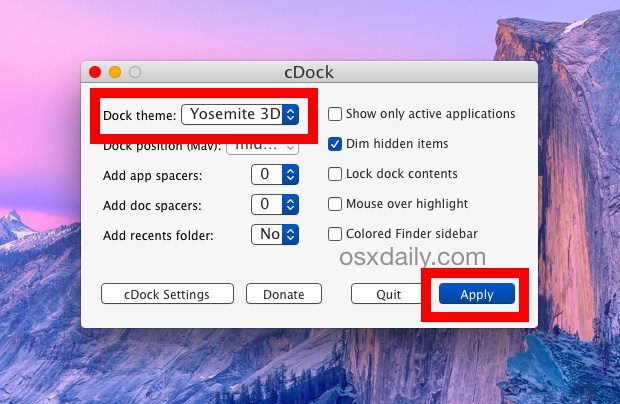
1. Get CDock for free from Source Forget (click the green download button)
2. Unzip the app you’ll need to right-click and choose to “Open” to circumvent Gatekeeper restrictions
3. Click the “Dock theme:” submenu and choose “Yosemite 3D”, then click on “Apply”
4. The Dock will refresh and magically turn 3D again


You can also choose a transparent dock.


Friday, March 15, 2013

Apple Releases Mac OS X Mountain Lion 10.8.3 With Boot Camp Support for Windows 8


Apple has released Mac OS X Mountain Lion 10.8.3 which brings Boot Camp support for Windows 8.

OS X Update 10.8.3:
The 10.8.3 update is recommended for all OS X Mountain Lion users and includes features and fixes that improve the stability, compatibility, and security of your Mac, including the following:
● The ability to redeem iTunes gift cards in the Mac App Store using your Mac's built-in camera
● Boot Camp support for installing Windows 8
● Boot Camp support for Macs with a 3TB hard drive
● A fix for an issue that could cause a file URL to quit apps unexpectedly
● A fix for an issue that may cause Logic Pro to become unresponsive when using certain plug-ins
● A fix for an issue that causes audio to stutter on 2011 iMacs
● Includes Safari 6.0.3

You can get the update by selecting Software Update from the Apple Menu at the top left of your screen.

Friday, July 13, 2012

Download OS X 10.8 Mountain Lion GM Build 12A269

1. Download Mac OS X Mountain Lion Golden Master Build from here >>>>> ** Download **

2. Update

3. Enjoy !!!

Wednesday, June 13, 2012

Apple Introduces OS X Mountain Lion [Video]


Apple has posted an introductory video detailing the new features in OS X Mountain Lion. The new operating system will be released next month for $19.99.


Wednesday, February 1, 2012

iOSOpenDev Let You Use Xcode To Develop Cydia Tweats


The iOSOpenDev project will come with Xcode templates for creating common types of jailbreak tweaks, including Activator listeners, command line tools, dynamic libraries, Notification Center widgets, SBSettings toggles, and Mobile Substrate tweaks. It will even build .deb files of the completed projects for when a developer wants to submit to Cydia for publication. The project should be available soon, but there is not ETA at the moment. We will keep you updated. Stay tuned…

Tuesday, December 20, 2011

The right way to install Mac OS X Lion.

OS X Lion

The process of upgrade from Snow leopard to Lion cause so many troubles to some users which raised their comment on the blog about the lion performance, battery draining, super hot mac book with lion upgraded.

Actually and definitely we have a solution to get lion installed without any hassle, as following :


  1. Insert the Lion installation DVD 
  2. Reboot the Mac
  3. At startup press c to boot from the DVD reader
  4. Launch Disk Utility
  5. Erase the hard drive where Snow Leopard is installed
  6. Quit Disk Utility and continue with the installation of OS X Lion
  7. After Lion is installed let it finish indexing your hard-drive. Don’t install any 3rd party software or migrate your data.
  8. Install all the latest updates (10.7.1, iTunes etc.)
  9. Restart your Mac
NORMALLY YOUR BATTERY SHOULD BE IN GOOD PROPER WAY OF USING,
IF THE BATTERY STILL DRAINING FAST THEN CONTINUE THESE FOLLOWING STEPS:
  1. At startup press the Option key to select the drive to boot from
  2. Select the Lion Recovery Partition
  3. Launch Disk Utility and repair permissions on the disk where you’ve installed Lion
  4. Quit and restart your Mac by pressing Command + Option + P + R. This will reset your PRAM
  5. Start installing your applications and restore your data

In addition to that I also:

a. Set Dashboard not to show as a Space
b. Disabled the automatic restore of windows when reopening applications

Friday, December 16, 2011

FIX Battery draining after updated to Mac OS X Lion

I hace noticed that the battery performance of my macbook draining after upgrade to Mac Os Lion,

I have searched and exploring on the cloud to find the root of the issue, many folks post about this issue on the internet that their macbook is getting slow, battery draining and getting so hot !!!!

finally i have collected few solutions for the above issues which is instructed as following :


. Disabling Spotlight :
Launch Terminal and type the following:sudo nano /etc/hostconfig
Navigate using the arrow keys down the following entry:SPOTLIGHT=-YES-
ChangeSPOTLIGHT=-YES-toSPOTLIGHT=-NO-
Save /etc/hostconfig by hitting Control-O and the return key, next hit Control-X to exit the nano editor
Next, you’ll want to disable the index by typing the following in the Terminal:
mdutil -i off /
And to erase the current Spotlight index, type:mdutil -E /
That’s pretty much it, on your next reboot, Spotlight will be completely disabled.


. Reset Power Manager :
1. Turn off the computer.
2. Hold down Ctrl+Option+shift
3. While holding down these button, press and hold the power button as well.
4. Hold all buttons for at least ten seconds.
5. power back on the computer.

Wednesday, September 21, 2011

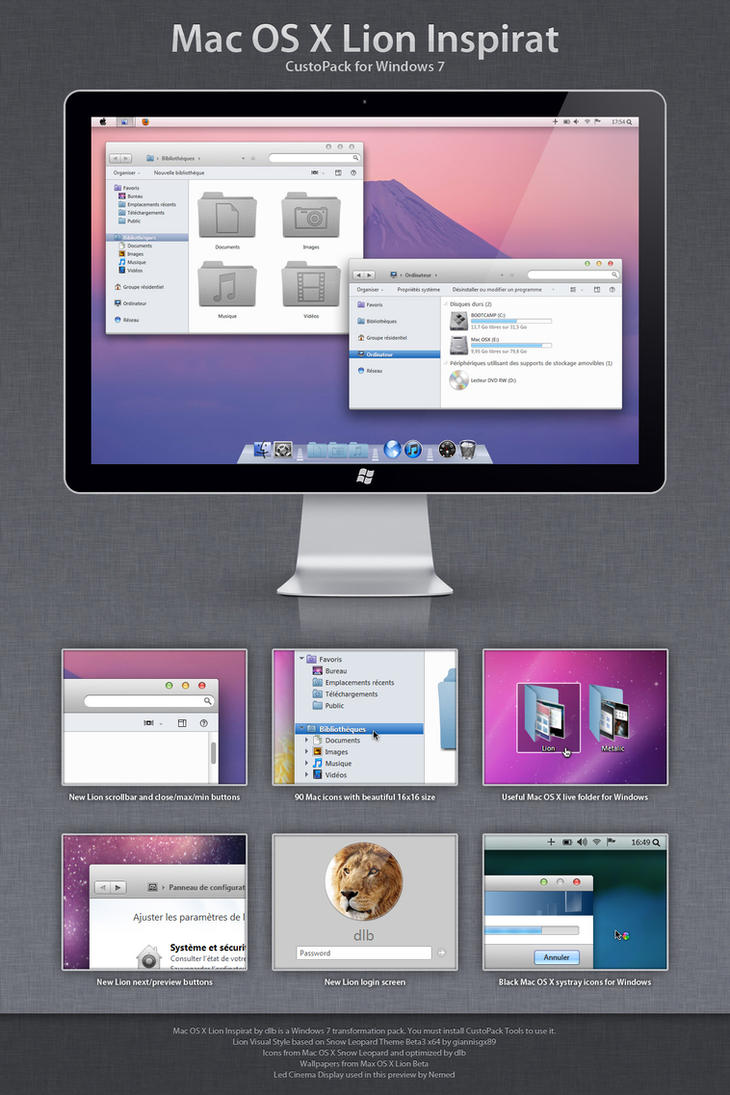
Download Apple Mac OS X Lion Theme for Windows 7


Are you a fan of Mac ?, Have you ever felt like running windows 7 with a feel of Mac OS X Lion ?
Mac OS X has always been termed as more elegant than any other OS. If you are a fan of it, here’s a OS X Lion theme for windows 7 developed by a DeviantART member, David Pieron. The theme packs several icons, utilities like the dock and a wallpaper to give your desktop a feel of Mac.

Download: Mac OS X Lion theme for Windows 7 | CustoPack


Friday, July 22, 2011

Download Mac OS X Lion Bootable


OS X Lion


Download Mac OS X Lion Bootable >> .torrent

How to Make a Bootable Mac OS X Lion USB Install Key

These are instructions on how to make a bootable Mac OS X Lion USB install key.


Step One
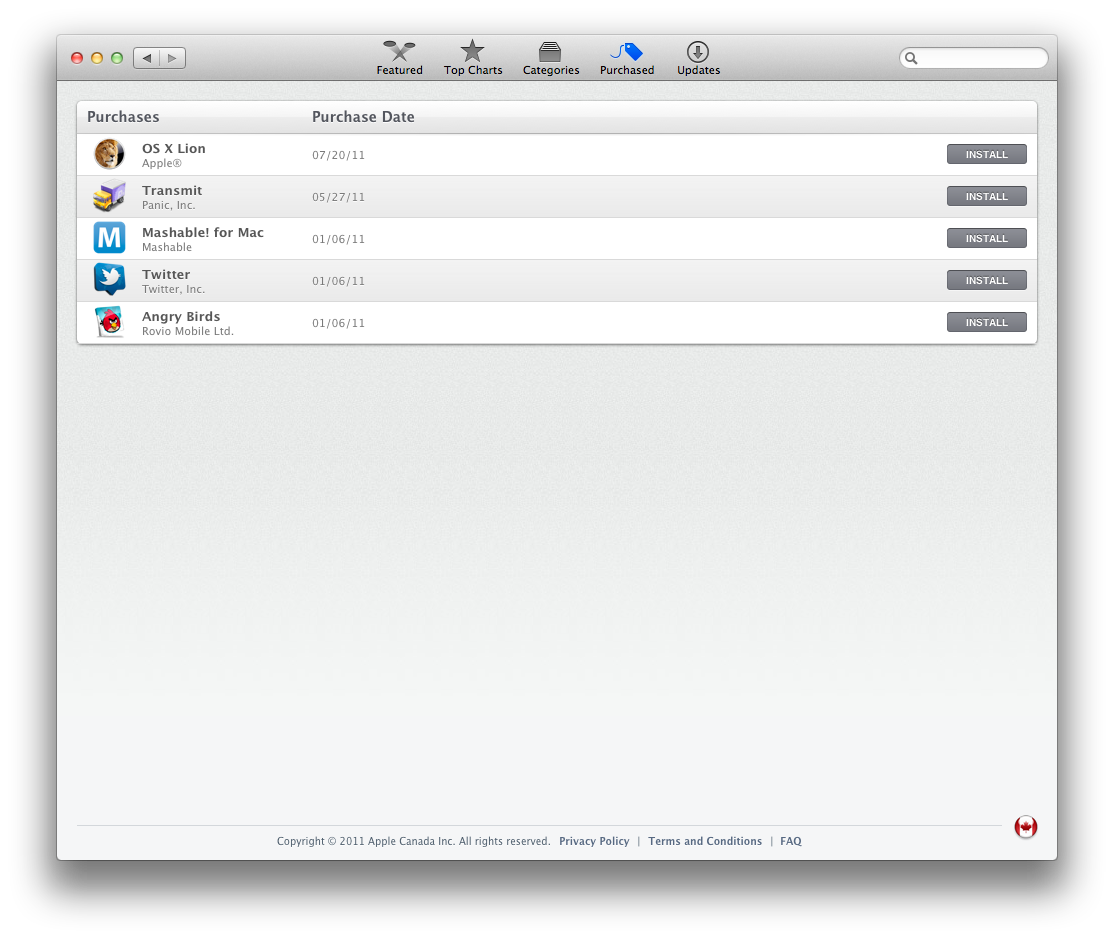
Connect a 8GB or larger USB key to your computer then launch the Mac App Store from your dock.


Step Two
Click the Purchased tab at top of the window the hold down the Option key and click the Purchased tab again.


Thursday, June 16, 2011

3.4GHz i7 iMac With 256GB SSD May Be the Fastest Mac Ever [Video]

Apple has started shipping its 3.4GHz i7 iMac with a 256GB Solid State Drive, reports MacRumors. 

Macworld recently benchmarked this computer as the fastest Mac they've ever tested. Even faster than the current Mac Pros.

This $2699 BTO iMac takes the top-of-the-line standard configuration iMac—a $1999 27-inch 3.1GHz Core i5 quad-core model with a 1TB 7200-rpm hard drive—and replaces the processor and hard drive. The upgrade to a 3.4GHz Core i7 adds $200 to the price. And the 256GB SSD is an extra $500.

The 27-inch 3.4GHz Core i7 iMac with SSD is the fastest Mac we've tested. The previous Speedmark 6.5 record holder was a build-to-order Mac Pro with a 3.33GHz Xeon Westmere six-core processor, 8GB of RAM, and a price of $4074. Add a 27-inch Apple LED Cinema Display and the price jumps to $5073.


The video below shows the new iMac opening all its standard apps at record speed. Take a look!

Read More


Friday, June 10, 2011

Cydia for Mac

We recently reported that the creator of Cydia, Jay “saurik” Freeman, is close to releasing an official version of Cydia for the Mac. We speculated on if it was really necessary, and if it is important enough to thrive on a desktop ecosystem.
This “Mac Cydia” would seem to be Freeman’s direct attempt at the jailbreak, unfiltered version of the new Mac App Store and OS X Lion. Since the news of a Mac Cydia, there have been more details shared from Freeman himself about the goals and features of the OS X version of Cydia…
Ars Technica shared some information about the anticipated Mac Cydia and what Freeman had to say about his new endeavor,