1. Remove your previous installed dropbox from your system, you can do by apt-get remove dropbox or go to remove from your software center
2. Make sure you delete .dropbox-dist in your home directory, you can do this via your terminal :
sudo rm -fr ~/.dropbox-dist
3. Download this zip file Elementary Mods to your downloads folder
4. Extract the zip file
5. Open your terminal and navigate to your extracted folder location
6. Fire these command lines in order :
./dropbox-elementary.sh
sudo ./dropbox-elementary.sh
./dropbox-elementary.sh
7. Reboot your system after login you should see dropbox indicator icon on the top panel.
Showing posts with label Elementary OS. Show all posts
Friday, May 22, 2015
Sunday, August 11, 2013
Saturday, May 18, 2013
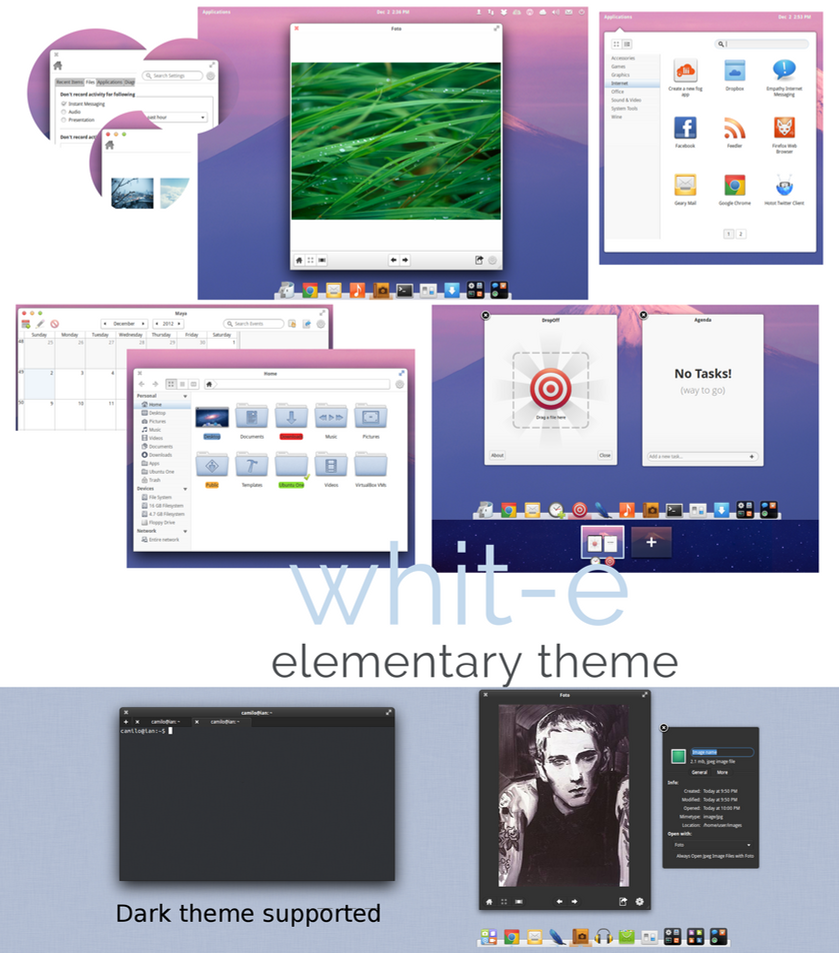
White e Theme for Elementary OS Luna.
1. Download >> White theme
2. Download >> Leon icon
How to install :
--------------------
. Extract the them folder into /usr/share/theme
. Extract the icon folder into /usr/share/icons
. Install Ubuntu tweak with these following command in your terminal :
sudo add-apt-repository ppa:tualatrix/ppa&&sudo apt-get update&&sudo apt-get install -y ubuntu-tweak
. Start Ubuntu tweak > Tweak > Theme > GTK theme > choose Whit-e theme.
. Enjoy !
Whit-e an elementary OS theme
1. Download >> Whit-e theme
2. Download >> Leon icon
How to install :
--------------------
. Extract the them folder into /usr/share/theme
. Extract the icon folder into /usr/share/icons
. Install Ubuntu tweak with these following command in your terminal :
sudo add-apt-repository ppa:tualatrix/ppa&&sudo apt-get update&&sudo apt-get install -y ubuntu-tweak
. Start Ubuntu tweak > Tweak > Theme > GTK theme > choose Whit-e theme.
. Enjoy !
Thursday, March 28, 2013
Elementary OS Luna has just released its own AppCenter
The elementary OS team has released the first version of AppCenter, a tool used to install and remove software, designed to be beautiful, fast and lightweight.

AppCenter uses the same backend as the Lubuntu Software Center (libappstore) and Packagekit and since this is the first public release, there are missing features such as ratings, reviews and featured apps, but these features should be available in a future release. The plan is to allow AppCenter to also handle application updates, but for now this isn't available.
The basic features are, of course, already available: installing/removing applications, displaying screenshots and so on.

AppCenter won't be included in elementary OS Luna by default, but it should be available in the following release.
The elementary OS team is also working on an application review process for both new and updated apps and based on some automated and hand testing, the applications will receive a score and if they pass a threshold, they will be published in the AppCenter. This will assure users that the applications will work well on their systems and it should also be fast enough so developers don't have to wait a lot until their app is published to the AppStore.

Install AppCenter from terminal :
sudo apt-get install appcenter

AppCenter uses the same backend as the Lubuntu Software Center (libappstore) and Packagekit and since this is the first public release, there are missing features such as ratings, reviews and featured apps, but these features should be available in a future release. The plan is to allow AppCenter to also handle application updates, but for now this isn't available.
The basic features are, of course, already available: installing/removing applications, displaying screenshots and so on.

AppCenter won't be included in elementary OS Luna by default, but it should be available in the following release.
The elementary OS team is also working on an application review process for both new and updated apps and based on some automated and hand testing, the applications will receive a score and if they pass a threshold, they will be published in the AppCenter. This will assure users that the applications will work well on their systems and it should also be fast enough so developers don't have to wait a lot until their app is published to the AppStore.

Install AppCenter from terminal :
sudo apt-get install appcenter
Wednesday, March 13, 2013
Friday, February 8, 2013
How to change Elementary OS Luna font to Ubuntu font.
1. Install Ubuntu font family with these following command line :
sudo apt-get install ttf-ubuntu-font-family
2. Install "dconf-editor" from Software center.
3. Launch dconf-editor and goto this following path :
org > gnome > desktop > interface
find the property called 'font-name' and replace with 'Ubuntu 10'. [ Note : 10 is the font size.]
sudo apt-get install ttf-ubuntu-font-family
2. Install "dconf-editor" from Software center.
3. Launch dconf-editor and goto this following path :
org > gnome > desktop > interface
find the property called 'font-name' and replace with 'Ubuntu 10'. [ Note : 10 is the font size.]
Tuesday, January 29, 2013
Subscribe to:
Posts (Atom)