iDock

iSteve

R.I.P STEVE JOBS 1955-FOREVER [PHYSICALLY GONE, MENTALLY STAYED.] THANK YOU STEVE FOR BRINGING THOSE GENIUS iDEVICES AND TURNING THE WORLD INTO THE COLORFUL GLOBE AND YOU'RE FOREVER MISSED.
Showing posts with label iFix. Show all posts

Friday, October 23, 2015

Facebook Identifies Issues That Caused Its App to Drain Your Battery, Releases Fix


Facebook has identified a few issues that have caused battery life issues with its iOS app and has released an update that addresses some of them.

We recently heard reports of some people experiencing battery issues with the Facebook iOS app and have been looking into the causes of these problems. We found a few key issues and have identified additional improvements, some of which are in the version of the app that was released today.

Here's some more details...

---
The first issue we found was a “CPU spin” in our network code. A CPU spin is like a child in a car asking, “Are we there yet? Are we there yet? Are we there yet?”with the question not resulting in any progress to reaching the destination. This repeated processing causes our app to use more battery than intended. The version released today has some improvements that should start making this better.

The second issue is with how we manage audio sessions. If you leave the Facebook app after watching a video, the audio session sometimes stays open as if the app was playing audio silently. This is similar to when you close a music app and want to keep listening to the music while you do other things, except in this case it was unintentional and nothing kept playing. The app isn't actually doing anything while awake in the background, but it does use more battery simply by being awake. Our fixes will solve this audio issue and remove background audio completely.

---

Facebook is quick to note that the problems are not caused by the Location History feature or anything related to location. It says it's committed to improving battery usage and that users should already seem improvements in the version released today.

You can download Facebook from the App Store for free.

Sunday, July 5, 2015

Fix khmer regional setting not working in iOS 8.X.X Calendar

How to fix khmer font is not shown in calendar :
. Add this source to cydia : http://samnang.myrepospace.com
. Install IOS 8.X.X Khmer Regional Fix
. Respring your iDevice


Friday, May 22, 2015

Fix Dropbox indicator is not shown in Elementary OS Freya

1. Remove your previous installed dropbox from your system, you can do by apt-get remove dropbox or go to remove from your software center

2. Make sure you delete .dropbox-dist in your home directory, you can do this via your terminal :
sudo rm -fr ~/.dropbox-dist

3. Download this zip file Elementary Mods to your downloads folder

4. Extract the zip file 

5. Open your terminal and navigate to your extracted folder location

6. Fire these command lines in order :
./dropbox-elementary.sh
sudo ./dropbox-elementary.sh
./dropbox-elementary.sh

7. Reboot your system after login you should see dropbox indicator icon on the top panel.

Fix color picker not working on LibreOffice 4.4.x.x


Fire up Terminal and paste the following command,
> cd /usr/lib/libreoffice/share/config/soffice.cfg/svx/ui
> sudo nano colorwindow.ui
You now need to set the “Visible” flag of the GtkWindow to “False” instead of “True” (currently its on line 15)


Ctrl + o , press enter to save the file.
Ctrl + x to exit
Open Libreoffice and check if the color picker now works.

Friday, February 27, 2015

Carrier Settings Update prompt.

You are probably prompted with the Carrier Settings Update. Actually it is safe to click on the update to fix the problem of the carrier setting itself, Anyway for those of you who use GPP Sim to unlock, you also free to update according to the GPP forum :


Q: I installed a new three networks dedicated patch NEW GPP, why will pop-up operators to update?

A: NEW GPP is crack update operators are not shielded carrier updates, update prompt will still pop up, but click update would not suffer carriers blocked, please rest assured.

Be aware of BOOT LOOP problem in iOS 8.X JAILBREAK !!!

Make sure you turn off your passcode and Touch ID before you reboot your iDevices After you installed any tweaks from Cydia, because some tweaks might get your iDevices into BOOT LOOP state which is cannot be bypassed by reboot + holding your volume button IF YOU LEFT YOUR PASSCODE AND TOUCH ID ON.

So again for those of you who love to tweak your iPhone with the current jailbreak PP Jailbreak, you should turn off your passcode and Touch ID everytime you reboot your iDevices.

Wednesday, December 17, 2014

AutoFreeRam (IOS 8)


Would you like AutoFreeRam (IOS 8) on your iDevice? This tweak is pretty useful for your iPhone performance :

1. add http://cydia.myrepospace.com/mundosapple/ to your Cydia Sources

2. Install AutoFreeRam

3. You can find its configuration in setting > AutoFreeRam

4. Everytime you close every running app in your AppSwitcher, an amount of RAM will be released to gain more RAM to your iDevices.

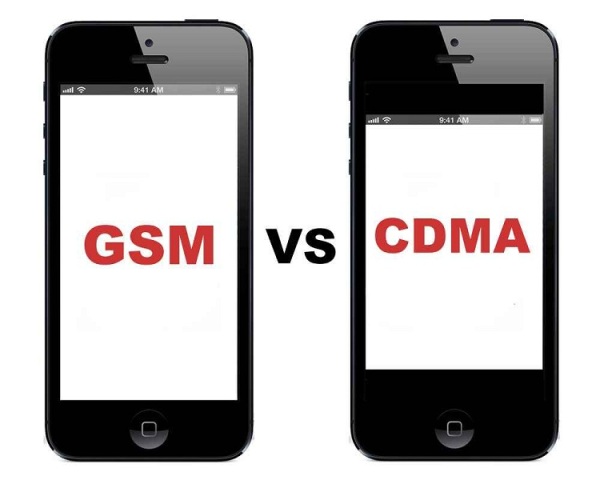
How to identify iPhone GSM or CDMA


Here following is the official list of iPhone GSM and CDMA from Apple :

http://support.apple.com/en-us/HT201296

For those of you who still wondering what is GSM and CDMA (GLOBAL) Here is the description from wiki :

. GSM (Global System for Mobile Communications, originally Groupe Spécial Mobile), is a standard developed by theEuropean Telecommunications Standards Institute (ETSI) to describe protocols for second-generation (2G) digital cellular networks used by mobile phones. As of 2014 it has become the default global standard for mobile communications - with over 90% market share, operating in over 219 countries and territories

. CDMA (Code division multiple access) is a channel access method used by various radio communication technologies.

CDMA is an example of multiple access, which is where several transmitters can send information simultaneously over a single communication channel. This allows several users to share a band of frequencies (see bandwidth). To permit this without undue interference between the users, CDMA employs spread-spectrum technology and a special coding scheme (where each transmitter is assigned a code).

CDMA is used as the access method in many mobile phone standards such as cdmaOne, CDMA2000 (the 3G evolution of cdmaOne), and WCDMA (the 3G standard used by GSM carriers), which are often referred to as simply CDMA.

Fix USSD iOS 8 on GEVEY SIM


Currently on iOS 8 you cannot request USSD for your balance with the iPhone which is unlocked by using GEVEY Sim or GPP, Luckily there is a workaround for that :

1. Add this repo in your Cydia http://bovor.net/ios
2. Search for this program Fix USSD iOS 8.x (áž‘្ážšáž“ាáž”់សីុម)
3. Click Install and Confirm
4. Reboot your device and try to request the USSD for your balance

If the above method is not working for you try this following instead :

This guide will help you to use USSD code for iPhone unlocked by sim interposer .
1. Goto Cydia to install iFile .
2. add this repo http://cydia.myrepospace.com/applelab
3. install CommCenter Patch iOS8 . ( if you got "size mismatch error" , use this repo instead "http://DJHartley.myrepospace.com/" ) .
4. Open iFile --> browse to /System/Library/Carrier Bundles/iPhone/Default.bundle/
5. Click on carrier.plst and select "Viewer PList" .
6. Turn ON "SupportsSupplementaryServices" , click Done .
7. Reboot your iPhone .

Thursday, November 27, 2014

iOS 8 Wi-Fi Issues Blamed on Bonjour Over AWDL, WiFried Fix Released in Cydia

The root problem of the poor wifi connection is because there is a bug on Apple using Bonjour over AWDL (Apple's Wireless Direct Link) for AirDrop AirPlay and Gaming Connections on the iOS8. And Apple is going to fix this.

But in the meantime for those of you who has problem with wifi connectivity with iOS8 - 8.1 and don't want to loose your jailbreak, here is a fix :
. Go to cydia and install WiFried

The package will allow you to enable/disable your D2DWiFi/AWDL and can be conveniently turned off/on under the AirDrop settings in Control Center.

Monday, November 24, 2014

Fix for iOS 8 – iOS 8.1 Wi-Fi issues to be released on Cydia soon

Good news, all of you who has problem with wifi connection with iOS 8-8.1, there will be a fix soon on cydia, so stayed tune.... do not upgrade to 8.1.1 which apple claimed to fix all the wifi problem on iPad2 and iPhone 4s if you do not want to loose your jailbreak.

Friday, November 21, 2014

Insert Photos into iOS8 Notes

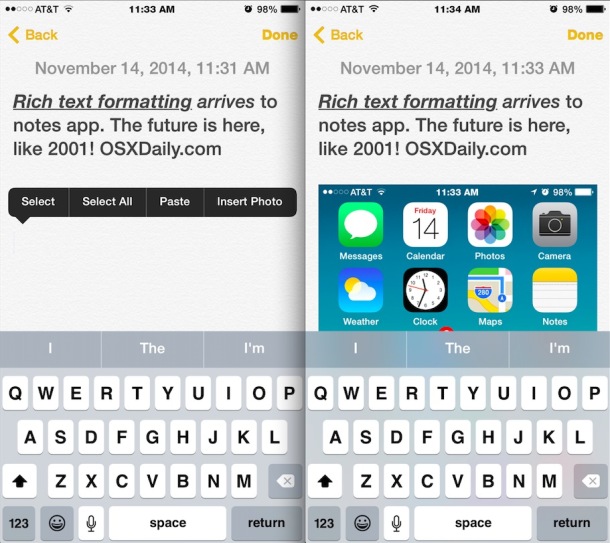
I've just realized iOS 8 Notes can be embeded with photo, the insertion is simple just tap and hold on your note and then click on Insert Photo button.

Wednesday, November 5, 2014

How to identify iPhone GSM, CDMA, GSM + CDMA

Check the Model no. at the back of your iPhone and verify with these following model numbers :

A1457, A1530 – iPhone 5S (GSM) 
A1453 – iPhone 5S (CDMA)
A1533 – iPhone 5S (GSM + CDMA)

A1507, A1529 – iPhone 5C (GSM)
A1456 – iPhone 5C (CDMA)

A1532 – iPhone 5C (GSM + CDMA)

A1428 – iPhone 5 GSM (standard GSM model in USA for AT&T, T-Mobile, etc)
A1429 – iPhone 5 GSM & CDMA (normal CDMA model in USA, Verizon, Sprint, etc)
A1442 – iPhone 5 CDMA China


A1387 – iPhone 4S, CDMA & GSM
A1431 – iPhone 4S GSM China


A1349 – iPhone 4 CDMA
A1332 – iPhone 4 GSM


A1325 – iPhone 3GS China
A1303 – iPhone 3GS (GSM only)


A1324 – iPhone 3G China
A1241 – iPhone 3G (GSM only)


A1203 – iPhone (Original model, GSM only)

Friday, December 27, 2013

Khmer font, keyboard for iOS7 on iPhone

. Add Repo : 4khmeriphone/sp to your cydia
. Install iOS 7+ 5rows keyboard for iPhone.

If you see thai keyboard instead, then try this following : 
. remove the keyboard and font from cydia 
. Install iFile from Cydia
. Use iFile to delete /var/mobile/Library/Caches/com.apple.keyboards
. Reinstall Mobile Substrate
. Re-install iOS 7+ 5rows for iPhone

Thursday, December 19, 2013

HOW TO SELECT GRUB BOOT LOADER BY DEFAULT ORDER :

1. sudo gedit /boot/grub/grub.cfg
2. Replace set default="0" WITH set default="x"
3. Reboot

Note : index is started from ZERO and x is your prefered boot order.
so according to the picture windows 7 is number 4.

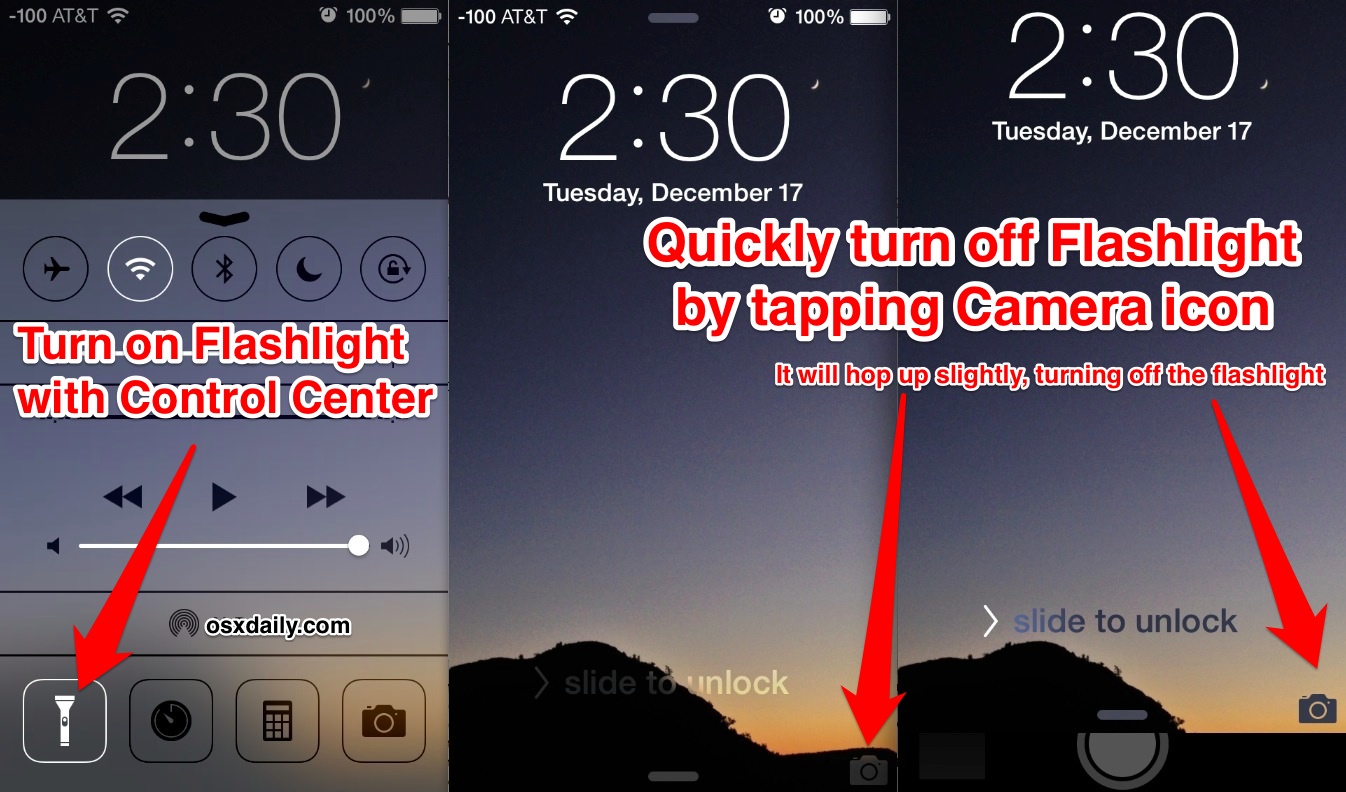
Turn Off the iPhone Flashlight with a Quick Camera Tap


Wednesday, October 9, 2013

10 Tips On How To Use iPhone Headphones


You can use the center button (between the volume up (+) and volume down (-) buttons) on the mic portion of your headphones to perform some useful functions without taking your iOS device from your pocket.

If you use headphones with your iPhone, iPad or iPod touch then you will find these tips quite handy.
Here are 10 cool things you can do with the buttons on your headphones (some of you may already know them):

1. Activate Siri
iPhone 4S users can activate Siri by pressing and holding the center button.

2. Take a Photo
Launch the Camera app and press the volume-up (+) button on the headphone to take a photo. (This feature is available in iOS 5 or later)


3. Pause/Play a Song or Video
You can pause or play a song or video by pressing the center button.

4. Skip to the Next Song or Chapter
To skip the next song or chapter, press the center button twice quickly.


5. Go to Previous Song or Chapter
To go back to the previous song, press the center button thrice quickly.

6. Fast Forward a Song
To fast forward a song, press the center button twice and hold the center button on the second press.


7. Rewind a Song
To rewind a song, press the center button thrice and hold the center down on the third press.


8. Answer a Call or Hang up
If you get a call, press the center button to answer it and press it again to hang up.


9. Decline Incoming Call
To decline an incoming call, press the center button and hold for approximately two seconds. You should hear two beeps, which confirms that the caller was sent to voicemail.


10. Switch Calls
If you get a new call when you’re on the phone, press the center button once to switch calls. To end that new call, press and hold the center button down for 2 seconds.


Please note that these tricks should work with any headphones that include a remote or have a remote adapter. These tricks should also work on your iPad and iPod touch (except activating Siri).

Thursday, July 11, 2013

Linux USB Creator for Mac

Are you having a trouble to boot a linux installer from USB flash on mac machine ? and you already tried this instruction but still no luck http://www.ubuntu.com/download/desktop/create-a-usb-stick-on-mac-osx

lately i have been googled around this topic but none of those instruction worked.

Finally i have found a simple tool to create linux bootable usb on mac which is very easy to approach.

. Go to download Linux USB Creator for mac http://penguintosh.com/2012/02/26/linux-usb-creator-released/
. Launch the tool and follow the screen instruction or you can follow the instruction in the website. after that reboot your mac and press the alt key to boot from your USB flash.

Thursday, April 18, 2013

Fix auto-mute function when a headphone is plugged into your linux machine.

Normally the speakers of your laptop is automatically in mute state when you plug the earphones or headphones, and if you're having problem with the aut-mute function when your plug a headphone or earphones on ubuntu or any linux operating system, means both speakers and headphones are all having 
the sound from your machine here is a simple fix :

- Open terminal and hit this command line :
sudo gedit /etc/modprobe.d/alsa-base.conf

- add this line at the end of the line :
options snd-hda-intel model=auto probe_mask=1

- Reboot and done.

Friday, March 22, 2013

How to fix touchpad performance of linux on Macbook machine.

I bet you'll be having problem with touchpad performance on macbook running linux system, because i've been through that.

It's kinda annoying when the touchpad does not perform as it does on os x mountain lion.

The touchpad sensitivity is gone bad on linux system. Sometimes it clicks wherever i don't want to click, it selects area i don't want to as well. I've been through those trouble times.
I've googled around the globe, tried many suggestions like synclient....etc. but none of those are working.

Finally i found an efficient solution which is a tool called 'synaptiks', just go to software center and install  it. And configure these following properties with your own preference, example :

Minimum speed : 0.49
Maximum speed : 8.10
Acceleration factor : 0.069

and check the option of 'For All movements, not only dragging'.

After that you'll be thankful to iPPLE.