iDock

iSteve

R.I.P STEVE JOBS 1955-FOREVER [PHYSICALLY GONE, MENTALLY STAYED.] THANK YOU STEVE FOR BRINGING THOSE GENIUS iDEVICES AND TURNING THE WORLD INTO THE COLORFUL GLOBE AND YOU'RE FOREVER MISSED.
Showing posts with label iLinux. Show all posts

Friday, May 22, 2015

Fix Dropbox indicator is not shown in Elementary OS Freya

1. Remove your previous installed dropbox from your system, you can do by apt-get remove dropbox or go to remove from your software center

2. Make sure you delete .dropbox-dist in your home directory, you can do this via your terminal :
sudo rm -fr ~/.dropbox-dist

3. Download this zip file Elementary Mods to your downloads folder

4. Extract the zip file 

5. Open your terminal and navigate to your extracted folder location

6. Fire these command lines in order :
./dropbox-elementary.sh
sudo ./dropbox-elementary.sh
./dropbox-elementary.sh

7. Reboot your system after login you should see dropbox indicator icon on the top panel.

Fix color picker not working on LibreOffice 4.4.x.x


Fire up Terminal and paste the following command,
> cd /usr/lib/libreoffice/share/config/soffice.cfg/svx/ui
> sudo nano colorwindow.ui
You now need to set the “Visible” flag of the GtkWindow to “False” instead of “True” (currently its on line 15)


Ctrl + o , press enter to save the file.
Ctrl + x to exit
Open Libreoffice and check if the color picker now works.

Thursday, December 19, 2013

HOW TO SELECT GRUB BOOT LOADER BY DEFAULT ORDER :

1. sudo gedit /boot/grub/grub.cfg
2. Replace set default="0" WITH set default="x"
3. Reboot

Note : index is started from ZERO and x is your prefered boot order.
so according to the picture windows 7 is number 4.

Tuesday, October 29, 2013

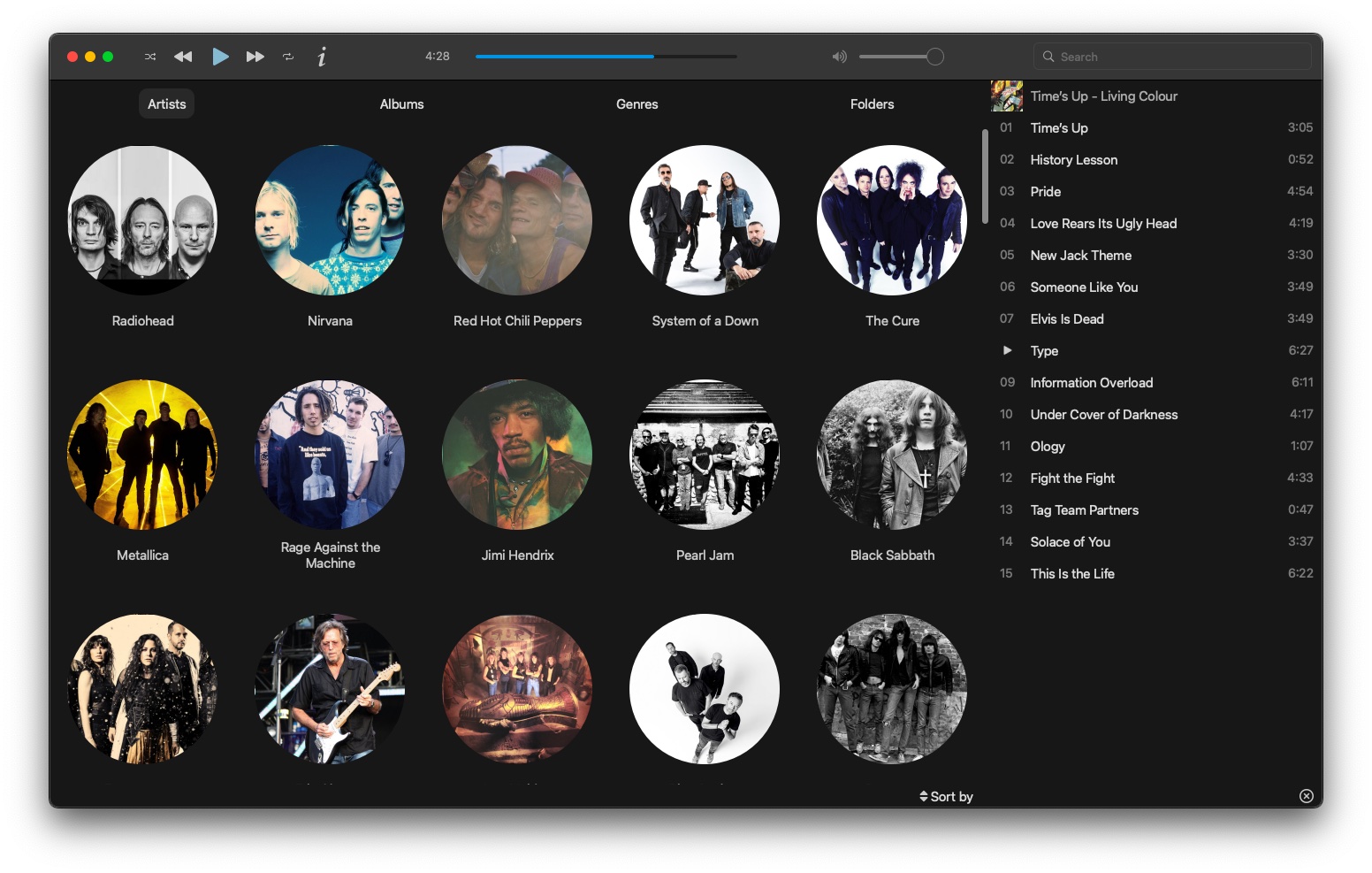
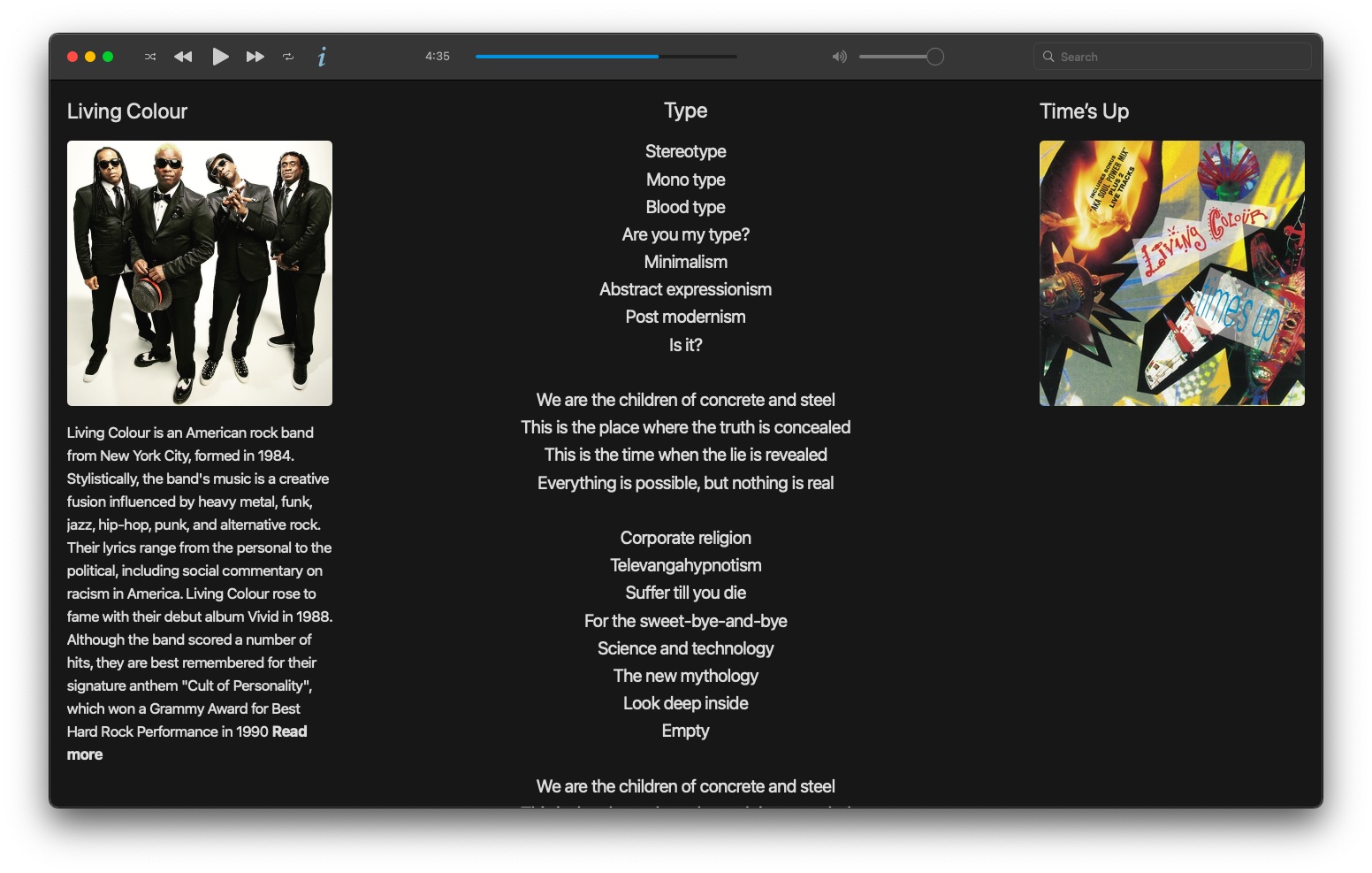
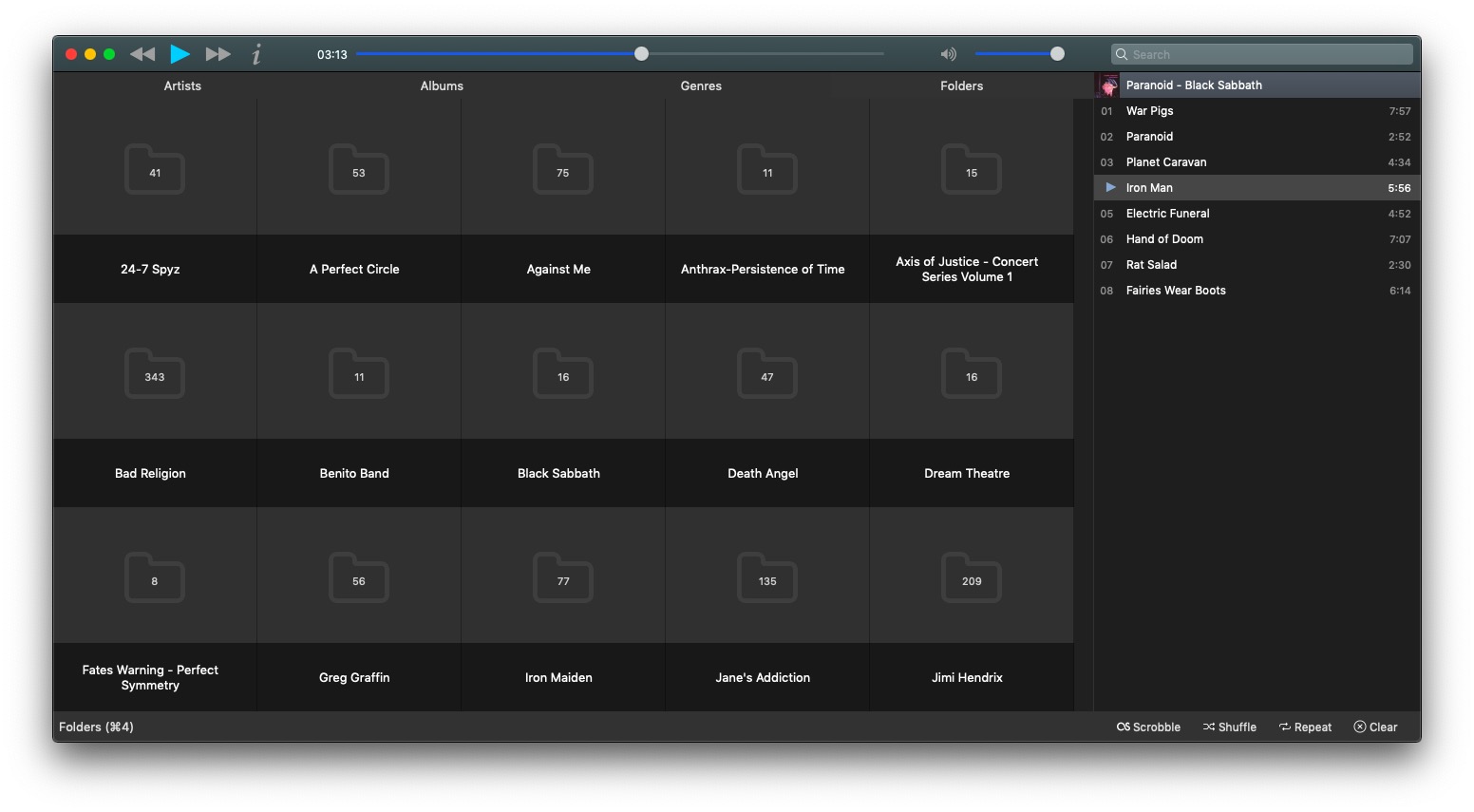
MUSIQUE is the best application to play music.

Musique is the best application to play musics on Windows, Mac and Linux.

Musique let you play music and manage your music with ease and fancy interface.Once you have imported your music to library everymood ,every albums, every artist, every genre, every folder is every your desire.

http://flavio.tordini.org/musique


Sunday, October 20, 2013

Pear OS 8 Beta 3 is realeased.


Pear OS is one of Linux Operating System which is mac-like user interface and give its user a good sense of sight and also a satisfied performance compare to OS X.

Currently Pear OS is up to 8 Beta 3 and the final release will be releasing in this fall 31th October 2013.And here following are screenshots to show off how Pear OS 8 looks like :

Pear Contact : Pear Contacts brings together your contacts and displays them on a single sheet.


Clean My Pear : Is the new facility for you to clean your pear system.


My Pear 6 : is the system setting for Pear OS 8


http://pearlinux.fr/

Thursday, July 11, 2013

Linux USB Creator for Mac

Are you having a trouble to boot a linux installer from USB flash on mac machine ? and you already tried this instruction but still no luck http://www.ubuntu.com/download/desktop/create-a-usb-stick-on-mac-osx

lately i have been googled around this topic but none of those instruction worked.

Finally i have found a simple tool to create linux bootable usb on mac which is very easy to approach.

. Go to download Linux USB Creator for mac http://penguintosh.com/2012/02/26/linux-usb-creator-released/
. Launch the tool and follow the screen instruction or you can follow the instruction in the website. after that reboot your mac and press the alt key to boot from your USB flash.

Saturday, May 18, 2013

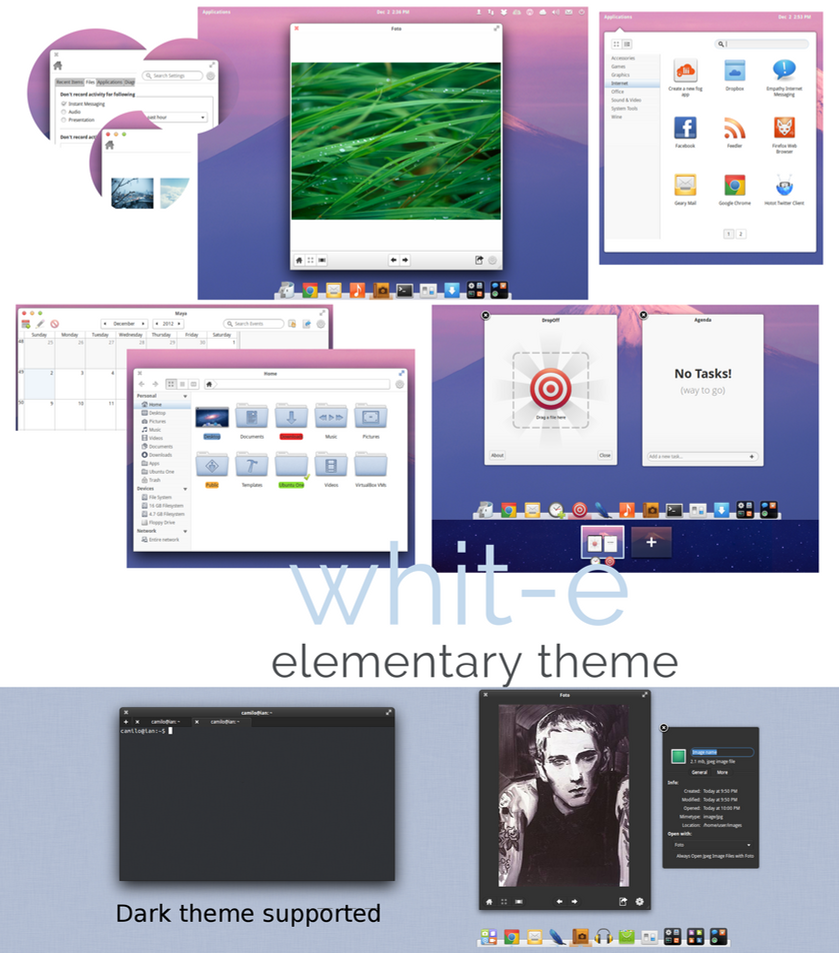
White e Theme for Elementary OS Luna.


1. Download >> White theme

2. Download >> Leon icon

How to install :
--------------------
. Extract the them folder into /usr/share/theme

. Extract the icon folder into /usr/share/icons
. Install Ubuntu tweak with these following command in your terminal :
sudo add-apt-repository ppa:tualatrix/ppa&&sudo apt-get update&&sudo apt-get install -y ubuntu-tweak
. Start Ubuntu tweak > Tweak > Theme > GTK theme > choose Whit-e theme.
. Enjoy !

Whit-e an elementary OS theme


1. Download >> Whit-e theme
2. Download >> Leon icon

How to install :
--------------------
. Extract the them folder into /usr/share/theme
. Extract the icon folder into /usr/share/icons
. Install Ubuntu tweak with these following command in your terminal :
  sudo add-apt-repository ppa:tualatrix/ppa&&sudo apt-get update&&sudo apt-get install -y ubuntu-tweak
. Start Ubuntu tweak > Tweak > Theme > GTK theme > choose Whit-e theme.
. Enjoy !

Thursday, April 25, 2013

BITTORRENT SYNC: SECURE FILE SYNC BETWEEN COMPUTERS USING P2P TECHNOLOGY [PUBLIC ALPHA]


BitTorrent Sync, a free to use (but not open source) tool that can be used to automatically synchronize files between computers using the BitTorrent protocol, is now available for all as public alpha. The application runs on Linux, Windows, Mac OS X and NAS.


The tool, which has been in closed alpha for the past four months, is advertised as "a simple tool that applies p2p protocol for direct live folder sync with maximum security, network speed and storage capacity".

And indeed, BitTorrent Sync is a great way of syncing and sharing files between computers, even files that you usually wouldn't trust with cloud sync tools such as Dropbox: besides the files being transferred directly between the users (so your files don't end up on some cloud server), the connection is encrypted with a AES cypher and a 256-bit key created on the base of your Secret, a random 20 byte or more string. For increased security, there's also an option to generate a Secret that expires after a day.


Basically, this peer-to-peer (p2p) sync tool can be compared with cloud sync services such as Dropbox or Ubuntu One, but no server is involved which also means that the sync can be faster than such services and there are no space restrictions (except your HDD). This also means the computers need to be online for the sync to work, obviously.


How to use BitTorrent Sync on Linux

Arch Linux users can install BitTorrent Sync via AUR.

To use BitTorrent Sync (or "BtSync") on Linux, download and extract the binary for your architecture (Ubuntu users: use the "Linux i386" or "Linux x64" links on the left; don't download the "glib 2.3" binaries), extract it and to run it, simply type the following in a terminal (assuming you've extracted the "btsync" binary in your home folder):


./btsync

To see a list of available options, type:
./btsync --help

And if you want to stop BitTorrent Sync, use:
killall btsync


BitTorrent Sync doesn't come with a GUI for Linux, but it can be configured through a web interface so once you've started BtSync like we've explained above, open a web browser and enter the following URL: http://localhost:8888/gui/
Now let's add a folder to sync. To do this, click "Add folder", then browse for a folder you want to sync and also click "Generate" to generate a Secret for this folder. Then click "Add" to add the folder:


If you want to connect to other devices / synchronize a folder from a remote computer on your machine, follow the same steps as above, but instead of clicking "Generate" for the Secret, paste the Secret generated for the folder from the remote computer.
On Linux, most of the settings aren't available in the web interface. Instead, you can run:
./btsync --dump-sample-config > sync.conf


Which will create a new "sync.conf" file with a sample configuration file. Modify the settings in this file to suit your needs and then run BtSync using the following command (which will make BtSync use the newly created configuration file):./btsync --config sync.conf

For more on how to use BitTorrent Sync on Linux but also on Windows and Mac OS X, see the User Guide PDF file.

Download BitTorrent Sync for Linux, Windows, Mac OS X and NAS.

Thursday, April 18, 2013

Fix auto-mute function when a headphone is plugged into your linux machine.

Normally the speakers of your laptop is automatically in mute state when you plug the earphones or headphones, and if you're having problem with the aut-mute function when your plug a headphone or earphones on ubuntu or any linux operating system, means both speakers and headphones are all having 
the sound from your machine here is a simple fix :

- Open terminal and hit this command line :
sudo gedit /etc/modprobe.d/alsa-base.conf

- add this line at the end of the line :
options snd-hda-intel model=auto probe_mask=1

- Reboot and done.

Thursday, March 28, 2013

Elementary OS Luna has just released its own AppCenter

The elementary OS team has released the first version of AppCenter, a tool used to install and remove software, designed to be beautiful, fast and lightweight.


AppCenter uses the same backend as the Lubuntu Software Center (libappstore) and Packagekit and since this is the first public release, there are missing features such as ratings, reviews and featured apps, but these features should be available in a future release. The plan is to allow AppCenter to also handle application updates, but for now this isn't available.


The basic features are, of course, already available: installing/removing applications, displaying screenshots and so on.


AppCenter won't be included in elementary OS Luna by default, but it should be available in the following release.


The elementary OS team is also working on an application review process for both new and updated apps and based on some automated and hand testing, the applications will receive a score and if they pass a threshold, they will be published in the AppCenter. This will assure users that the applications will work well on their systems and it should also be fast enough so developers don't have to wait a lot until their app is published to the AppStore.


Install AppCenter from terminal :

sudo apt-get install appcenter

Friday, March 22, 2013

How to fix touchpad performance of linux on Macbook machine.

I bet you'll be having problem with touchpad performance on macbook running linux system, because i've been through that.

It's kinda annoying when the touchpad does not perform as it does on os x mountain lion.

The touchpad sensitivity is gone bad on linux system. Sometimes it clicks wherever i don't want to click, it selects area i don't want to as well. I've been through those trouble times.
I've googled around the globe, tried many suggestions like synclient....etc. but none of those are working.

Finally i found an efficient solution which is a tool called 'synaptiks', just go to software center and install  it. And configure these following properties with your own preference, example :

Minimum speed : 0.49
Maximum speed : 8.10
Acceleration factor : 0.069

and check the option of 'For All movements, not only dragging'.

After that you'll be thankful to iPPLE.

How to mount Mac partition with write permission.

Are you using linux operating system on a macbook and you also have some partitions which are formatted in HFS+ (journaled) ? Normally the mac partition is automatically mounted in linux system with read-only permission, means you cannot create or delete any files or folder in mac partition.

Actually there is a workaround for this access by disable journaling with these following steps:

- Boot into mac os x
- Launch Disk Utility
- Select the partition you wanted to access from Linux
- Hold option Key still, and browse the file menu and choose 'Disable Journaling'


Done !!. Restart and boot into linux system, from there after you have full access to the mac  partition.

Note : By default, Mac OS X formats volumes injournaled HFS+ volumes. Journaling is a feature that improves data reliability, and unfortunately it makes HFS drives read-only in Linux.

Thursday, February 14, 2013

How to install Pantheon Desktop on Ubuntu 12.04 - 12.10


Pantheon Desktop is the default desktop for Elementary OS Luna which is built on top of Ubuntu 12.04, Pantheon Desktop looks very clean and tidy. It is the coolest desktop i have ever experienced and ever, i just can't wait to get the final release of Elementary OS Luna. By the way the Beta 2 is a about to release now so it won't be so long for the final release.


For those of you who's using Ubuntu there's also a possibility to ship Pantheon Desktop into Ubuntu with these following command :

sudo add-apt-repository ppa:elementary-os/daily
sudo apt-get update
sudo apt-get install elementary-desktop

After the installation, log-out and select 'Pantheon session' to login.

Friday, February 8, 2013

How to change Elementary OS Luna font to Ubuntu font.

1. Install Ubuntu font family with these following command line :
sudo apt-get install ttf-ubuntu-font-family

2. Install "dconf-editor" from Software center.

3. Launch dconf-editor and goto this following path :
org > gnome > desktop > interface
find the property called 'font-name' and replace with 'Ubuntu 10'. [ Note : 10 is the font size.]


Wednesday, January 16, 2013

Fedora 18 Spherical Cows

Fedora is one of the Linux Operating System which is rated as #3 Linux operating system, now has released a new version of 18 with better performance and many new features as following :

System Storage Manager (SSM).

This is an easy-to-use command-line interface tool that presents a unified view of storage management tools. Devices, storage pools, volumes, and snapshots can now be managed with one tool, with the same syntax for managing all of your storage. In addition, Fedora now includes StorageManagement, a collection of tools and libraries for managing storage area networks (SAN) and network attached storage (NAS).